
Uncategorized
Huawei IdeaHub B2 IHB2-75PU 75″ 4K UHD Intelligent Collaboration Display Blog
Huawei IdeaHub B2 IHB2-75PU 75″ 4K UHD Intelligent Collaboration Display Review
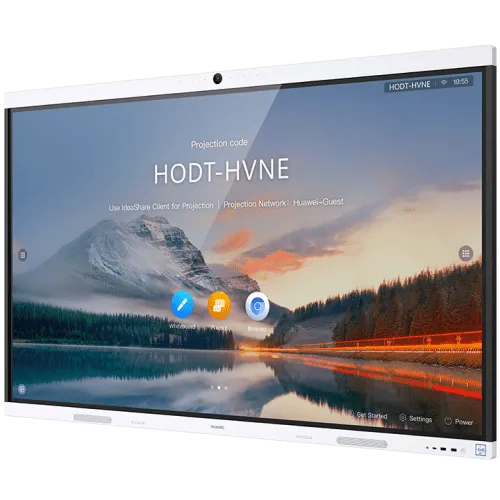
Huawei IdeaHub B2 IHB2-75PU 75″ 4K UHD Intelligent Collaboration Display Review in Kenya
With hybrid work and digital learning transforming collaboration norms across Kenya’s commercial and institutional landscapes, interactive display solutions have moved beyond whiteboards and projectors into purpose-built collaboration hubs.
The Huawei IdeaHub B2 IHB2-75PU is an enterprise-oriented 75-inch 4K UHD intelligent collaboration display engineered to support high-impact meetings, dynamic presentations, hybrid classrooms, and structured teamwork.
This review evaluates the device’s real-world performance, collaboration capabilities, deployment considerations, and total value proposition for Kenyan enterprises and institutions.
Display Excellence — 75″ 4K UHD for Clear & Engaging Visuals
At 75 inches with native 4K UHD resolution (3840 × 2160), the Huawei IdeaHub B2 delivers:
Sharp rendering of detailed content
Readable multi-column spreadsheets
High-fidelity images in training materials
Rich cinematic video playback during presentations
In executive boardrooms, digital lecture halls, or hybrid meeting spaces across Nairobi, Mombasa, Kisumu and beyond, a high-resolution display ensures participants stay engaged and content remains legible even from a distance.
The anti-glare panel further enhances visibility in naturally bright conference rooms — a staple of many Kenyan workplaces.
Intelligent Collaboration Tools — Designed for Team Interaction
Unlike standard large-format displays, the IdeaHub B2 is engineered as an interactive collaboration platform. Key interactive capabilities include:
Multi-touch annotation with low latency
On-screen ideation tools
Real-time content markup
Dual-user simultaneous writing
Low-latency input ensures writing and gestures feel immediate — a critical factor in maintaining the flow of brainstorming sessions, classroom discussions, and strategic planning workshops.
For Kenya’s enterprise teams and educators alike, responsive interaction enhances productivity and student engagement.
Hybrid Work Ready — Integrated Conferencing & Seamless Sharing
Hybrid work is now mainstream, and collaboration displays must support remote participants without complex hardware setups.
The IdeaHub B2 integrates:
A professional camera system
High-sensitivity microphone array
Built-in speakers
Wireless screen sharing
This all-in-one architecture eliminates external conferencing hardware clutter and minimizes setup time — speeding transitions between onsite and remote collaboration.
Kenyan organizations striving to elevate virtual collaboration workflows benefit from this unified system, eliminating frequent troubleshooting and hardware incompatibilities.
Wireless Connectivity & Cross-Device Sharing
Participants can mirror content wirelessly from laptops, tablets, and mobile devices, streamlining meeting flow and reducing cable dependency — a frequent pain point in traditional AV setups.
Wireless sharing supports:
Multi-device participation
Quick session hand-offs
Dynamic content exchange
This flexibility is particularly valuable in workshops and collaborative classes where multiple users present content in rapid succession.
Performance & Internal System Stability
Enterprise collaboration displays must handle concurrent tasks — such as streaming video, screen sharing, whiteboarding, and conferencing — without lag.
The Huawei IdeaHub B2’s internal processing architecture is built to maintain stable performance under load, ensuring:
Consistent touch responsiveness
Smooth multi-point interaction
Reliable conference streaming
In structured organizational environments where delays can disrupt productivity, system stability is foundational.
Enterprise & Education Use Cases in Kenya
The IHB2-75PU is well suited for:
Corporate Boardrooms: For executive presentations, strategy alignment, and cross-department collaboration.
Training Centers: Where hands-on workshops and participant engagement are key.
Universities & Colleges: To support interactive lectures and blended learning.
Government Institutions: For collaborative planning and inter-agency meetings.
Private Schools: As part of modern digital classroom rollouts.
Unlike consumer interactive TVs, this device is purpose-built to withstand the demands of high-frequency, multi-user environments.
Installation & Deployment Considerations
To maximize performance in Kenyan environments, deployment planning should consider:
Room size & sightlines — ensuring comfortable viewing distances.
Mounting infrastructure — secure wall mounts or configurable stands.
Network reliability — stable Wi-Fi or wired connectivity.
Power stability — uninterrupted supply with surge protection.
Structured installation enables consistent user experiences and long-term reliability.
Comparison: IdeaHub B2 vs Traditional Projection Systems
| Feature | Huawei IdeaHub B2 IHB2-75PU | Traditional Projector + Display |
|---|---|---|
| Resolution | Native 4K UHD | Often lower, depends on projector |
| Interactivity | Multi-touch and annotation | Minimal or none |
| Conferencing | Built-in | Requires external devices |
| Cable Management | Minimal | High |
| Setup Time | Faster | Slower |
| Maintenance | Lower | Bulb replacements & calibration |
For Kenyan enterprises and institutions seeking to replace legacy projection setups, integrated collaboration displays like the IdeaHub B2 offer scalable, future-ready infrastructure.
Is the Huawei IdeaHub B2 IHB2-75PU Worth the Investment in Kenya?
For occasional presentations or smaller teams, the investment may be more than what basic display needs require.
However, for organizations with consistent collaboration requirements — including hybrid teams, interactive training, or structured classroom environments — the display becomes a core infrastructure component, offering:
Reduced pre-meeting setup time
Higher engagement through responsive interaction
Lower long-term maintenance costs
Professional-grade conferencing features
When evaluated as collaboration infrastructure rather than just a large screen, the value proposition strengthens significantly.