
Uncategorized
Hikvision DS-D5B75RB-EL 75″ 4K Interactive Flat Panel Review Blog
Hikvision DS-D5B75RB-EL 75″ 4K Interactive Flat Panel Review
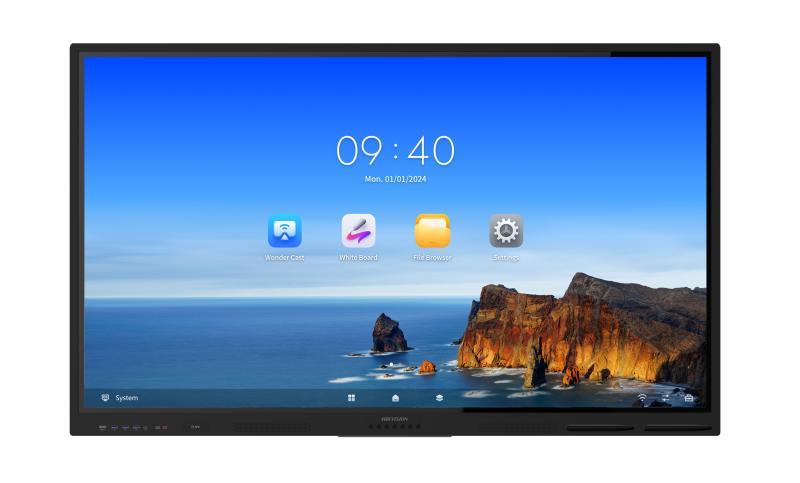
Hikvision DS-D5B75RB-EL 75″ 4K Interactive Flat Panel Review in Kenya
Modern digital workspaces and interactive learning environments increasingly require displays that do more than just present visuals — they must support real-time collaboration, hybrid communication, and workflow-centric interaction. The Hikvision DS-D5B75RB-EL 75″ 4K interactive flat panel is designed to meet these needs, delivering a large-format 4K collaboration display suitable for corporate boardrooms, hybrid classrooms, and structured meeting environments.
In this review, we assess its display quality, interactive capabilities, integration features, deployment considerations, and suitability for Kenyan enterprises and institutions.
Display & Visual Performance — 75″ 4K UHD
The 75-inch 4K UHD (3840 × 2160) panel provides crisp, high-resolution visuals that are essential for:
Data-rich presentations and analytics dashboards
Detailed engineering and architectural visuals
Multi-window layouts in hybrid meetings
Video conferencing with remote participants
High pixel density improves legibility across medium-to-large spaces, making this panel especially valuable in Kenyan boardrooms, lecture halls, training centers, and collaboration suites. Wide viewing angles and an anti-glare surface further ensure consistent clarity in well-lit meeting rooms and naturally bright institutional settings.
Interactive Capabilities — Responsive Touch & Annotation
The DS-D5B75RB-EL supports multi-touch interaction with precise touch response, enabling:
Natural handwriting and annotation
Direct on-screen content manipulation
Multi-user participation during sessions
Highlighting and markup during presentations
Responsive touch with low latency is important for maintaining collaboration flow during workshops, brainstorming sessions, and classroom activities. These capabilities move the display beyond passive content presentation into an interactive engagement tool.
Collaboration Tools & Connectivity
Collaborative workflows increasingly depend on seamless sharing across devices. The Hikvision interactive panel incorporates:
Built-in annotation tools and whiteboard application support
Wireless screen mirroring for laptops, tablets, and mobile devices
Multi-platform connectivity (USB, HDMI, network interfaces)
Wireless content sharing eliminates cable dependency, enabling participants to present from their devices quickly. This capability is especially valuable in dynamic meeting environments and multi-presenter educational sessions.
Hybrid Work & Conferencing Integration
Hybrid work models have become standard in many Kenyan organizations. While some interactive panels require external peripherals for conferencing, the DS-D5B75RB-EL is designed to integrate with third-party conferencing hardware and software, enabling:
Remote participant video feeds
Shared screen content during hybrid meetings
Centralized display of local and remote content
When paired with compatible cameras and microphones, the panel becomes a hub for structured hybrid collaboration.
Performance & Operational Stability
Enterprise-grade interactive displays must handle concurrent tasks — such as annotation, multimedia playback, wireless sharing, and conferencing — without perceptible delay. The Hikvision panel is engineered for:
Smooth real-time interaction
Consistent multi-task performance
Stable display operation during extended sessions
In high-use environments like corporate training rooms, hybrid classrooms, and strategic planning spaces, performance stability is critical.
Enterprise & Education Use Cases in Kenya
The DS-D5B75RB-EL is well-suited for a range of applications:
Corporate Boardrooms
Strategy and planning sessions
Cross-functional collaboration workshops
Client presentations with interactive markup
Educational Spaces
University lectures and seminars
Interactive classroom instruction
Student group activities with annotation
Training & Development Centers
Professional upskilling and certification courses
Hands-on technical training sessions
Unlike consumer touchscreen TVs, which are designed for casual use, this panel supports high-frequency, multi-participant interaction suitable for structured workflows.
Installation & Deployment Considerations in Kenya
To maximize performance and user experience, organizations should plan:
Room layout and sightlines — Ensuring all participants can view content clearly.
Secure mounting options — Ceiling or wall mounts that align with space design.
Network infrastructure — Wired or reliable Wi-Fi for content sharing.
Power stability — Surge-protected supply for long-term reliability.
Thoughtful installation ensures consistent usability and long-term return on investment.
Hikvision Interactive Panel vs Traditional Display Setups
| Feature | Hikvision DS-D5B75RB-EL | Traditional Projector + Whiteboard |
|---|---|---|
| Native 4K UHD | ✔ | Often lower resolution |
| Multi-Touch Interaction | ✔ | ✘ |
| Wireless Content Sharing | ✔ | ✘ |
| Conferencing Integration | Supported | Requires external devices |
| Cable Complexity | Reduced | High |
| Setup Time | Shorter | Longer |
| Maintenance | Lower | Bulb replacements & calibration |
For Kenyan enterprises and institutions upgrading legacy AV systems, interactive panels like the DS-D5B75RB-EL provide a scalable, collaboration-ready platform.
Is the Hikvision DS-D5B75RB-EL Worth the Investment in Kenya?
For basic content display needs, standard TVs or projectors may suffice. However, for organizations that rely on structured collaboration, hybrid meetings, and interactive training, this panel becomes a core productivity tool.
Key benefits include:
Reduced setup and transition times
Improved engagement and interactivity
Simplified device connectivity
Long-term reliability with lower maintenance overhead
When evaluated as collaboration infrastructure instead of just a display, the value proposition becomes stronger for Kenyan enterprises and institutions.