
Uncategorized
Samsung Essential Monitor (LS24D300GAMXUE)
Introduction & First Impressions
The Samsung Essential Monitor a 24″ Full HD display targeted squarely at students and everyday users. With model number LS24D300GAMXUE, this is Samsung’s answer to the growing demand for a capable best budget monitor fhd that doesn’t force users to compromise on visual quality or essential features. At first glance, the Essential Monitor makes a confident impression. Samsung’s industrial design language is unmistakably present clean lines, a remarkably thin profile, and a black finish that fits naturally into modern workspaces. But aesthetics are only half the story. The real question is whether this 24″ panel delivers the performance that today’s students and everyday users genuinely need. In this review, we put the Samsung LS24D300GAMXUE through its paces examining everything from out-of-the-box colour accuracy to real-world responsiveness and connectivity options. Whether you’re hunting for an affordable essential monitor monitor or need the best monitor for everyday use, read on to find out if this Samsung delivers.
Full Technical Specifications
Before diving into performance, here’s a complete breakdown of the Samsung Essential Monitor’s specifications:
| Specification | Details |
|---|---|
| Model Number | LS24D300GAMXUE |
| Monitor Type | Samsung Essential Monitor |
| Screen Size | 24″ |
| Panel Technology | IPS |
| Resolution | 1920 x 1080 (Full HD / 1080p) |
| Refresh Rate | 100Hz |
| Response Time | 5ms (GtG) |
| Brightness | 300 nits |
| HDR Support | None |
| Connectivity | HDMI x2, DisplayPort 1.2, Audio Out |
| Colour | Black |
| Category | FHD |
| Segment | Flat (Essential Monitor) |
Design & Build Quality
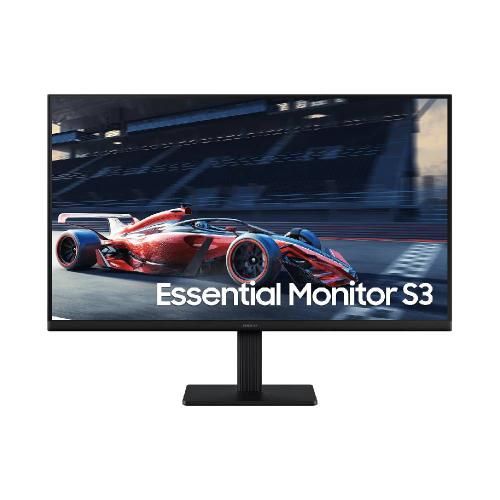
The Samsung Essential Monitor comes in Samsung’s signature black finish, giving it a clean and modern look that fits well in any setup. One of the first things you’ll notice is the slim-bezel design with thin bezels on the top and sides, the 24-inch display feels more immersive without taking up unnecessary desk space. At the back, the monitor maintains a minimalist aesthetic, with neatly arranged ports and support for VESA mounting, making it easy to attach to a monitor arm or wall mount for a more flexible setup. The included stand is made of plastic but feels stable and well-built. It offers basic tilt adjustment, allowing you to find a comfortable viewing angle. Overall, the build quality is solid and in line with Samsung’s reputation dependable, sturdy, and built to last without unwanted wobbling or creaking over time.
Display Performance
Colour Accuracy & Vibrancy
The IPS panel at the heart of the Samsung Essential Monitor delivers good colour reproduction with wide viewing angles, making it a reliable choice for both professional and leisure use. Out of the box, colours are well-calibrated for the target audience, with balanced, natural tones suited to everyday tasks.
Resolution & Sharpness
At 1920 x 1080 across a 24″ panel, the pixel density delivers clean, sharp visuals that are perfectly adequate for everyday tasks.
Motion Handling & Refresh Rate
For productivity and creative workflows, the 100Hz refresh rate is perfectly adequate text renders crisply and scrolling is smooth.
Key Features
- Everyday Computing
- Web Browsing
- Office Work
- Light Media Consumption
- IPS Panel Technology — Offers reliable performance with consistent colour and brightness
- 1080p Resolution (1920 x 1080) — Sharp, immersive visuals for gaming and entertainment
- 100Hz Refresh Rate — Smooth, flicker-free performance for productivity
- Connectivity: HDMI x2, DisplayPort 1.2, Audio Out
- Eye Comfort Technology — Flicker-free backlight and blue light filter reduce eye fatigue during extended sessions
Performance Analysis
In day-to-day use, the Samsung Essential Monitor proves itself a dependable workhorse. For students, home offices, and everyday computing, the monitor handles all tasks comfortably without fuss.
Performance Scores
Display Quality
8.0/10
Value for Money
8.5/10
Build & Design
8.3/10
Everyday Use
8.0/10
Who Should Buy the Samsung Essential Monitor?
The Samsung LS24D300GAMXUE is an excellent choice if you fall into one of these categories:
- Everyday Computing — The 100Hz refresh and 5ms (GtG) response time make this monitor purpose-built for the task.
- Web Browsing — The 100Hz refresh and 5ms (GtG) response time make this monitor purpose-built for the task.
- Office Work — The 100Hz refresh and 5ms (GtG) response time make this monitor purpose-built for the task.
- Light Media Consumption — The 100Hz refresh and 5ms (GtG) response time make this monitor purpose-built for the task.
How Does It Compare to Similar Monitors?
Context is everything. Here’s how the Samsung Essential Monitor stacks up against its closest rivals:
| Model | Key Specs | vs Samsung Essential Monitor |
|---|---|---|
| Samsung Essential Monitor (LS24D300GAMXUE) | IPS, 1080p, 100Hz, 24″ | Our Pick |
| LG 24MK430H-B | 24″ FHD IPS, similar price tier | IPS panel vs Samsung’s offering |
| AOC 24B2XH | 24″ FHD IPS budget monitor | Similar specs, less brand recognition |
| Dell E2422H | 24″ FHD IPS business monitor | Business-grade alternative |
While each of the above alternatives brings something unique to the table, the Samsung Essential Monitor distinguishes itself through Samsung’s ecosystem integration, build quality consistency, and strong after-sales support advantages that matter over the long run.
The Samsung Essential Monitor (LS24D300GAMXUE) is a well-executed 24″ 1080p display that earns its place in Samsung’s lineup. For students and everyday users, it delivers the right combination of reliability, sharp FHD visuals, and value at a competitive price.
Is it the best budget monitor fhd on the market right now? For most students and everyday users, the answer is a confident yes. As an affordable daily driver monitor, it covers the essentials without unnecessary complexity.
Frequently Asked Questions
Is the Samsung Essential Monitor good for everyday computing?
Yes the Samsung Essential Monitor is specifically designed with students and everyday users in mind. Its IPS panel, 1080p resolution, and 100Hz refresh rate make it well-suited for everyday computing.
Does the Samsung LS24D300GAMXUE support HDR?
The LS24D300GAMXUE does not include HDR support. For HDR content, consider stepping up to the 4K variants in Samsung’s lineup.
What cables and ports does the Samsung Essential Monitor include?
The Samsung Essential Monitor (LS24D300GAMXUE) includes the following connectivity options: HDMI x2, DisplayPort 1.2, Audio Out. This covers the needs of most users, from console gamers to laptop professionals.
Is the Samsung Essential Monitor compatible with Mac and Windows?
Yes, the Samsung LS24D300GAMXUE is fully compatible with both macOS and Windows systems via standard HDMI and DisplayPort inputs. USB-C compatibility is not included on this model, but HDMI and DisplayPort cover the vast majority of use cases.
How does the Samsung Essential Monitor compare to similar budget monitors?
The Samsung Essential Monitor competes strongly in the best budget monitor fhd segment. Compared to alternatives from LG and ASUS at similar price points, it offers a compelling combination of Samsung’s build quality, software ecosystem, and display performance.