
Uncategorized
Samsung Odyssey G5 (LS32CG552EMXUE)
Introduction & First Impressions
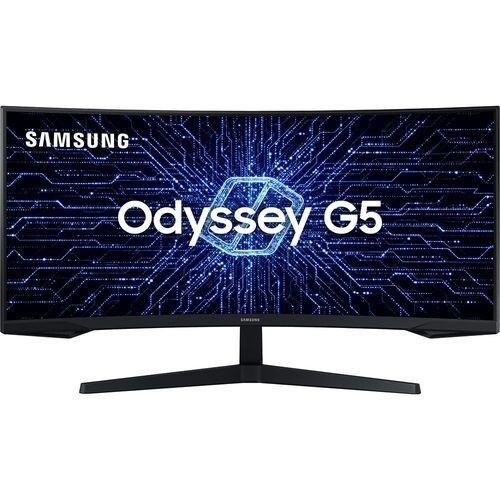
Samsung continues to strengthen its presence in the gaming monitor space with the Samsung Odyssey G5 a 32-inch Quad HD display aimed at gamers who want an immersive experience without stepping into premium price territory. With model number LS32CG552EMXUE, this model reflects the growing demand for capable QHD gaming monitors that balance performance, size, and affordability.
At first glance, the Odyssey G5 makes a confident impression. Samsung’s industrial design is immediately recognizable clean lines, a slim profile, and a minimalist black finish that fits comfortably into both gaming setups and everyday workspaces. While it won’t turn heads with aggressive styling, it feels purposeful and well put together.
Design aside, the real question is performance. A 32-inch QHD panel sits in an interesting position large enough to feel immersive, but demanding enough to require solid hardware to fully utilize. That makes it especially important to understand how well this monitor handles real-world gaming and day-to-day use.
In this review, we put the Samsung LS32CG552EMXUE through its paces evaluating its visual performance, responsiveness, and overall usability. Whether you’re considering an affordable Odyssey G5 or simply looking for a reliable QHD gaming monitor, this review breaks down what you can realistically expect.
| Specification | Details |
|---|---|
| Model Number | LS32CG552EMXUE |
| Screen Size | 32″ |
| Panel Technology | VA (Vertical Alignment) |
| Resolution | 2560 × 1440 (Quad HD / 1440p) |
| Refresh Rate | 165Hz |
| Response Time | 1ms (MPRT) |
| Brightness | Up to 350 nits (peak) |
| HDR Support | HDR10 (basic support) |
| Connectivity | HDMI 2.0 ×2, DisplayPort 1.2, 3.5mm Audio Out |
| Colour | Black |
Design & Build Quality
The Samsung Samsung Odyssey G5 arrives in a clean, understated black finish that fits easily into both gaming and office setups. One of the first things you’ll notice is the slim-bezel design — with thin side and top bezels that help the 32-inch panel feel immersive without dominating your desk space.
Around the back, the design remains minimal and functional. While cable management is fairly basic, the layout keeps connections accessible, and the monitor includes VESA mount support for users who prefer a monitor arm or wall setup.
The included stand is primarily plastic, but it feels stable in everyday use. It supports tilt adjustment, allowing you to position the screen comfortably, even if the range of motion is somewhat limited. Overall, the build quality aligns with expectations at this price point — solid enough for daily use without feeling premium.
Ergonomics
Ergonomically, the Odyssey G5 keeps things simple. Tilt adjustment is the only built-in option, with no height, swivel, or pivot functionality. While this will be sufficient for many users, those looking for more flexibility may find it restrictive.
For a more customizable setup, pairing the monitor with a VESA-compatible arm is a practical upgrade.
Display Performance
Colour Accuracy & Vibrancy
The Samsung Odyssey G5 uses a VA (Vertical Alignment) panel, which prioritizes strong contrast and deep blacks over absolute colour precision. Out of the box, colours appear vibrant and punchy, making the monitor well-suited for gaming and media consumption.
While colour reproduction is generally good for its class, it’s not aimed at professional-grade work where high colour accuracy is critical. Viewing angles are decent, though not as wide or consistent as what you’d get from an IPS panel.
Resolution & Sharpness
With a resolution of 2560 × 1440 on a 32-inch display, the Odyssey G5 delivers a good level of detail for both gaming and everyday use. Text and images appear clear at normal viewing distances, though the pixel density is lower compared to smaller 27-inch QHD panels.
This makes it a better fit for users who prioritize screen size and immersion over ultra-sharp pixel density.
Motion Handling & Refresh Rate
With a 165Hz refresh rate, the Odyssey G5 handles fast-moving content smoothly, providing a noticeable improvement over standard 60Hz displays. Gameplay feels fluid and responsive, particularly in fast-paced titles.
However, like many VA panels, some motion artifacts can be present especially in darker scenes where slight smearing may occur. While not a dealbreaker for most users, competitive players may notice the difference compared to higher-end IPS or esports-focused monitors.
Key Features
Smooth QHD Gaming Experience
Fast-Paced FPS and Action Titles
Immersive RPG and Open-World Gaming
VA Panel Technology — Delivers strong contrast and deep blacks for immersive visuals
2K Resolution (2560 × 1440) — Balanced clarity and performance for modern gaming
165Hz Refresh Rate — Smooth motion for fast-paced gameplay
Connectivity — HDMI 2.0 ×2, DisplayPort 1.2, 3.5mm Audio Out
AMD FreeSync (Adaptive Sync Support) — Helps reduce screen tearing and stuttering
Eye Comfort Features — Flicker-free technology and blue light reduction for longer sessions
HDR Support (HDR10) — Basic HDR capability for compatible content
Who Should Buy the Samsung Odyssey G5?
The Samsung LS32CG552EMXUE is a strong choice for users who prioritize immersive visuals and smooth gameplay without moving into premium pricing:
General & Enthusiast Gamers — The 165Hz refresh rate delivers smooth performance across a wide range of modern titles.
Fast-Paced FPS Players — While not esports-tier, the high refresh rate and low response time provide a responsive experience for shooters and action games.
RPG & Open-World Fans — The 32-inch screen and strong contrast from the VA panel enhance immersion in visually rich games.
Everyday Users Who Also Game — A good balance between gaming performance and general productivity use.
Who Should Skip It?
If you’re focused on ultra-competitive esports, where every millisecond matters, you may want to consider higher-end options with:
- 240Hz+ refresh rates
- Faster pixel response (often found in premium IPS or OLED panels)
For example, stepping up within Samsung’s Odyssey lineup to higher refresh rate models or exploring OLED variants would be more suitable for that level of play.
How Does It Compare to Similar Monitors?
Context matters. Here’s how the Samsung Odyssey G5 (LS32CG552EMXUE) compares to some of its closest competitors:
| Model | Key Specs | How It Compares |
|---|---|---|
| Samsung Odyssey G5 | 32″, QHD, 165Hz, VA | Larger screen, stronger contrast |
| LG 27GP850-B | 27″, QHD, Nano IPS, 165Hz | Better colour accuracy and viewing angles |
| MSI MAG274QRF-QD | 27″, QHD, QD-IPS, 165Hz | Wider colour gamut and more vibrant colours |
| ASUS TUF Gaming VG27AQL1A | 27″, QHD, IPS, 170Hz | Slightly higher refresh rate and strong all-round performance |
While these alternatives offer stronger colour performance thanks to IPS-based panels, the Odyssey G5 stands out with its larger 32-inch display and VA panel, which delivers deeper blacks and higher contrast.
This makes it particularly appealing for users who prioritize screen size and immersion, whereas the 27-inch IPS options are better suited for those who value colour accuracy and viewing angles.
Frequently Asked Questions
Is the Samsung Odyssey G5 good for competitive gaming?
The Samsung Odyssey G5 is well-suited for general and fast-paced gaming thanks to its 165Hz refresh rate and low response time. However, for high-level competitive esports, players may prefer faster 240Hz+ displays with quicker pixel response.
Does the Samsung LS32CG552EMXUE support HDR?
Yes, the LS32CG552EMXUE supports HDR10. While it can process HDR content, its overall HDR performance is limited due to brightness and lack of advanced local dimming.
What cables and ports does the Samsung Odyssey G5 include?
The Samsung Odyssey G5 (LS32CG552EMXUE) includes HDMI 2.0 ×2, DisplayPort 1.2, and a 3.5mm audio output. This covers most common setups, including gaming consoles and desktop PCs.
Is the Samsung Odyssey G5 compatible with Mac and Windows?
Yes, the LS32CG552EMXUE works with both macOS and Windows systems via HDMI and DisplayPort. However, it does not include USB-C connectivity, so adapters may be required for some modern laptops.
How does the Samsung Odyssey G5 compare to similar gaming monitors?
The Odyssey G5 competes well in the QHD gaming segment, offering a larger 32-inch display and strong contrast thanks to its VA panel. Compared to similarly priced IPS monitors from brands like LG and ASUS, it prioritizes immersion and deeper blacks over colour accuracy and viewing angles.
Final Verdict
The Samsung Odyssey G5 (LS32CG552EMXUE) is a well-rounded 32-inch QHD display that fits comfortably within Samsung’s gaming lineup. It delivers a strong balance of screen size, smooth performance, and immersive visuals at a competitive price point.
For most gamers, the combination of a 165Hz refresh rate and a high-contrast VA panel makes it an enjoyable monitor for both fast-paced and visually rich games. The larger 32-inch screen also adds to the sense of immersion, especially in open-world and story-driven titles.
That said, it’s not without trade-offs. Compared to similarly priced IPS monitors, it falls behind in colour accuracy, viewing angles, and motion clarity in certain scenarios. Competitive esports players may also prefer faster, higher-refresh alternatives.
So, is it the best QHD gaming monitor? For users who prioritize size, contrast, and overall immersion, it’s a strong contender. But for those who value colour precision or top-tier competitive performance, there are better-suited options.