
Uncategorized
Samsung Viewfinity S6 (LS24D606EAMXUE)
Samsung continues to strengthen its position in the monitor market with the Samsung ViewFinity S6 LS24D606EAMXUE a 24-inch QHD display designed for creative professionals and productivity-focused users. Positioned as a step up from standard Full HD monitors, it addresses the growing demand for sharper visuals and a more efficient workspace without pushing into ultra-premium pricing.
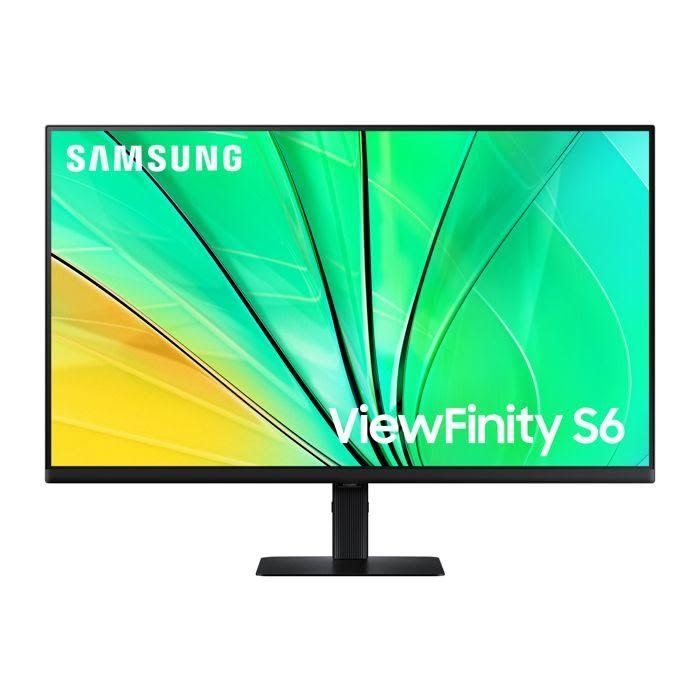
At first glance, the ViewFinity S6 makes a confident impression. Samsung’s signature design language is clearly on display clean lines, a slim profile, and a minimalist black finish that blends seamlessly into modern setups. It’s a monitor that looks professional without trying too hard.
But design is only part of the story. The real question is whether this 24-inch panel delivers the level of clarity, color accuracy, and performance that today’s professionals and power users expect.
In this review, we put the LS24D606EAMXUE through its paces evaluating everything from out-of-the-box color performance to real-world responsiveness and connectivity. Whether you’re searching for a reliable ViewFinity S6 monitor or a solid upgrade for productivity and creative work, here’s what you need to know.
Full Technical Specifications
Before diving into performance, here’s a complete breakdown of the Samsung Viewfinity S6’s specifications:
| Specification | Details |
|---|---|
| Model Number | LS24D606EAMXUE |
| Monitor Type | Samsung Viewfinity S6 |
| Screen Size | 24″ |
| Panel Technology | IPS |
| Resolution | 2560 × 1440 (QHD) |
| Refresh Rate | Up to 100Hz |
| Response Time | 5ms (GtG) |
| Brightness | ~350 nits (Typical) |
| HDR Support | HDR10 |
| Connectivity | HDMI, DisplayPort, USB Hub |
| Colour | Black |
| Category | QHD Monitor |
| Segment | ViewFinity (Professional/High-Resolution Series) |
Design & Build Quality
The Samsung ViewFinity S6 LS24D606EAMXUE arrives in Samsung’s signature black finish, giving it a clean and professional look that fits seamlessly into modern workspaces. The slim-bezel design is one of its standout features with thin bezels on the top and sides, the 24-inch panel feels immersive without taking up unnecessary desk space.
Around the back, the monitor maintains a minimalist aesthetic, with neatly arranged ports and support for VESA mounting, making it easy to attach to a monitor arm or wall mount. The included stand is primarily plastic but feels stable and well-constructed, offering a reassuring level of sturdiness for daily use.
Ergonomics
For users who spend long hours at their desks, ergonomics is a clear strength of the ViewFinity S6. The stand supports height adjustment, tilt, swivel, and pivot, allowing you to fine-tune the monitor to your ideal viewing position.
The inclusion of portrait mode is particularly useful for coding, document work, or reading long pages, while built-in cable management helps keep your setup neat and organized. Overall, it’s a highly practical and flexible design that suits both professional and home office environments.
Display Performance
Colour Accuracy & Vibrancy
The IPS panel at the heart of the Samsung ViewFinity S6 LS24D606EAMXUE delivers strong colour reproduction with wide viewing angles, making it a reliable choice for both professional and everyday use. Out of the box, colours are well-balanced and consistent, offering solid accuracy for tasks like content creation, design, and general media consumption.
Resolution & Sharpness
With a 2560 × 1440 (QHD) resolution on a 24-inch panel, the ViewFinity S6 provides a noticeable step up in clarity compared to Full HD displays. Text appears crisp, and images retain fine detail, making it particularly well-suited for productivity tasks that benefit from increased screen real estate.
Motion Handling & Refresh Rate
For productivity and creative workflows, the 100Hz refresh rate adds a layer of smoothness that goes beyond standard 60Hz panels. Scrolling feels more fluid, and general on-screen movement is noticeably cleaner, contributing to a more responsive overall experience.
Key Features
Video Editing
Graphic Design
Content Creation
Multitasking & Productivity
IPS Panel Technology — Consistent colours and wide viewing angles
QHD Resolution (2560 × 1440) — Sharp detail and improved workspace
100Hz Refresh Rate — Smoother visuals for everyday use
Connectivity — HDMI, DisplayPort, USB Hub
Factory Calibration — Tuned for reliable colour performance out of the box
Eye Comfort Features — Flicker-free technology and reduced blue light
HDR10 Support — Enhanced contrast for supported content
Who Should Buy the Samsung ViewFinity S6?
The Samsung ViewFinity S6 LS24D606EAMXUE is an excellent choice if you fall into any of the following categories:
Video Editing — The QHD resolution provides sharp detail for timelines and footage, while the IPS panel ensures consistent colours during editing sessions.
Graphic Design — With strong colour accuracy and wide viewing angles, it’s well-suited for design work where visual consistency matters.
Content Creation — Whether you’re creating thumbnails, social media content, or working with visuals, the added clarity and screen space improve overall workflow efficiency.
Multitasking & Productivity — The combination of QHD resolution and a 100Hz refresh rate makes everyday tasks feel smoother, especially when switching between windows or scrolling through documents.
Who Should Look Elsewhere?
While the ViewFinity S6 excels in productivity, it may not be the perfect fit for everyone.
- If you need Thunderbolt 4 or full USB-C workstation connectivity, you may need a more advanced model
- For professional print work, monitors with hardware calibration tools will offer better precision
- And for competitive gaming, a higher refresh rate display (144Hz+) would be a better choice
How Does It Compare to Similar Monitors?
Context is everything when choosing the right productivity display. Here’s how the Samsung ViewFinity S6 LS24D606EAMXUE stacks up against some of its closest rivals in the professional monitor space.
| Model | Key Specs | How It Compares |
|---|---|---|
| Samsung ViewFinity S6 (LS24D606EAMXUE) | 24″, IPS, QHD, 100Hz | Our Pick excellent balance of sharpness, smoothness, and ergonomics |
| LG 27UK850-W | 27″, 4K UHD, IPS, USB-C | Higher resolution and larger display, ideal for creators who need extra detail |
| Dell UltraSharp U2722D | 27″, QHD, IPS, USB-C | Excellent factory calibration and strong office workflow features |
| BenQ PD2725U | 27″, 4K, IPS, Thunderbolt | Best suited for professional creators and MacBook workflows |
While each of the above alternatives brings something unique to the table, the Samsung Viewfinity S6 distinguishes itself through Samsung’s ecosystem integration, build quality consistency, and strong after-sales support advantages that matter over the long run.
Frequently Asked Questions
Is the Samsung ViewFinity S6 good for video editing?
Yes the Samsung ViewFinity S6 LS24D606EAMXUE is a solid option for video editing, especially for beginners and intermediate creators. Its IPS panel delivers consistent colours, while the QHD resolution provides enough detail for timeline work and content creation. While it may not replace high-end colour-graded displays, it performs well for most everyday editing tasks.
Does the Samsung LS24D606EAMXUE support HDR?
Yes, the LS24D606EAMXUE supports HDR10, which enhances contrast and dynamic range when viewing supported content. However, like most monitors in this class, the HDR performance is modest rather than fully cinematic.
What ports and connectivity options does it offer?
The ViewFinity S6 includes HDMI and DisplayPort, along with a USB hub for connecting peripherals. Some regional variants may include USB-C, but it’s best to confirm with your retailer before purchase.
Is the Samsung ViewFinity S6 compatible with Mac and Windows?
Yes the monitor works seamlessly with both macOS and Windows devices via HDMI or DisplayPort. This makes it a flexible choice for a wide range of setups, from desktop PCs to laptops.
How does it compare to similar productivity monitors?
The ViewFinity S6 competes strongly in the QHD productivity monitor category. Compared to alternatives from LG, Dell, and BenQ, it offers a well-balanced combination of sharp resolution, smooth 100Hz performance, and strong ergonomics at a competitive price point.
Final Verdict
The Samsung ViewFinity S6 (LS24D606EAMXUE) is a well-executed 24″ QHD (2560 x 1440) display that earns its place in Samsung’s lineup as a high-density productivity tool. For creative professionals and power users working in compact spaces, it delivers an excellent combination of color accuracy, elite ergonomics, and modern connectivity at a competitive price point.
Is it the best productivity monitor in its class?
For users specifically seeking a compact, high-resolution workstation without the massive footprint of a 32-inch screen, the answer is a confident yes. While it is not a 4K UHD monitor, its 122 PPI (pixels per inch) provides sharpness that rivals larger 4K displays. It competes directly with mid-range offerings from LG and ASUS, but pulls ahead with a fluid 100Hz refresh rate and a tool-free ergonomic stand that is exceptionally easy to set up.