
Uncategorized
Samsung Viewfinity S6 (LS27D606EAMXUE)
Introduction & First Impressions
Samsung remains one of the leading players in the monitor market, and the ViewFinity S6 is part of its push toward high-resolution displays for modern workspaces. The 27-inch model (LS27D606EAMXUE) is designed with productivity users in mind, offering a balance of sharp visuals, clean design, and practical features.
At first glance, the ViewFinity S6 makes a confident impression. Samsung’s signature design language is evident, clean lines, a slim profile, and a minimalist black finish that fits comfortably into most setups. But beyond aesthetics, the real question is whether this monitor delivers the performance that today’s users actually need.
In this review, we’ll take a closer look at its colour performance, responsiveness, and connectivity to determine whether it’s a worthwhile choice for productivity and everyday creative work
Full Technical Specifications
Before diving into performance, here’s a complete breakdown of the Samsung Viewfinity S6’s specifications:
| Specification | Details |
|---|---|
| Model Number | LS27D606EAMXUE |
| Monitor Type | Samsung ViewFinity S6 |
| Screen Size | 27″ |
| Panel Technology | IPS |
| Resolution | 2560 × 1440 (QHD) |
| Refresh Rate | Up to 100Hz |
| Response Time | 5ms (GtG) |
| Brightness | ~350 nits (typical) |
| HDR Support | HDR10 |
| Connectivity | HDMI, DisplayPort 1.4, USB Hub |
| Colour | Black |
| Category | QHD Monitor |
| Segment | ViewFinity S6 (Productivity / Professional) |
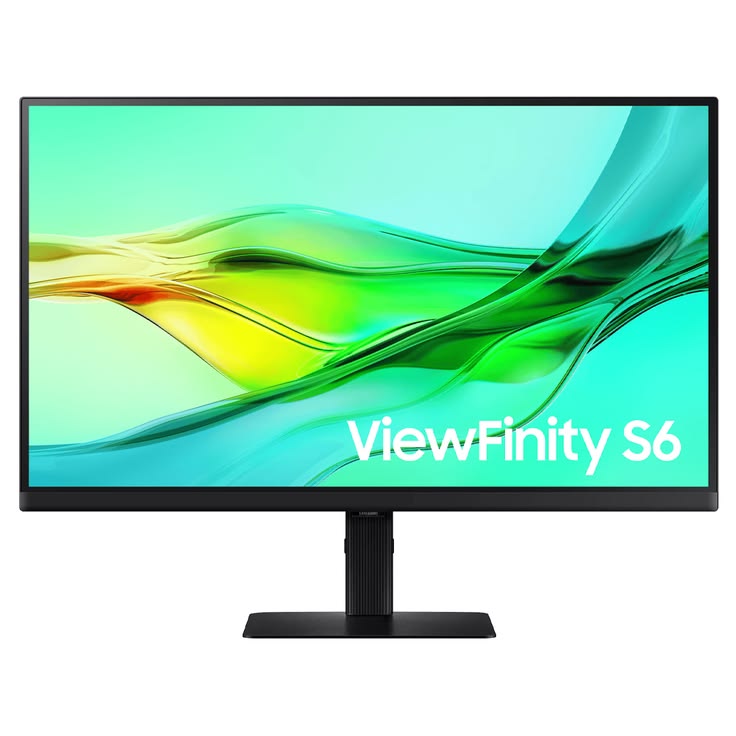
Design & Build Quality
The Samsung ViewFinity S6 comes in a matte black finish that fits easily into most modern workspaces. Its slim bezels on the top and sides give the 27-inch panel a more immersive feel without taking up unnecessary visual space on your desk. Around the back, the design remains minimal, with integrated cable management and a VESA-compatible mount for users who prefer a monitor arm or wall setup.
The included stand is primarily plastic, but it feels solid in everyday use. While it doesn’t have a premium metal finish, it provides enough stability for typical office and home setups without noticeable wobble.
Ergonomics
For users who spend long hours at their desk, ergonomics are an important consideration, and the ViewFinity S6 performs well here. The stand supports height adjustment and tilt, along with pivot functionality for portrait orientation. Combined with basic cable routing, this makes it a practical choice for productivity-focused workstations.
Display Performance
Colour Accuracy & Vibrancy
The Samsung ViewFinity S6 uses an IPS panel that delivers solid colour reproduction and wide viewing angles. Out of the box, colours are well-balanced for everyday use, making it a reliable option for productivity and light creative work such as photo editing or content creation. While it performs well in this class, it doesn’t quite reach the level of factory-calibrated professional displays.
Resolution & Sharpness
With a resolution of 2560 × 1440 (QHD) on a 27-inch panel, the monitor offers a good balance between clarity and performance. Text appears sharp, and there’s enough screen real estate to comfortably work with multiple windows side by side without the scaling challenges often associated with 4K displays.
Motion Handling & Refresh Rate
The ViewFinity S6 supports a refresh rate of up to 100Hz, which provides smoother scrolling and cursor movement compared to standard 60Hz monitors. While it’s not designed for high-end gaming, the added fluidity is a welcome improvement for everyday productivity and general use.
Key Features
Video Editing (light to moderate work)
Graphic Design (general use)
Content Creation
Multitasking and Productivity
IPS Panel Technology — Delivers consistent colours and wide viewing angles for everyday use
QHD Resolution (2560 × 1440) — Sharp visuals with ample screen space for multitasking
Up to 100Hz Refresh Rate — Smoother scrolling and improved responsiveness over standard 60Hz displays
Connectivity — HDMI, DisplayPort 1.4, and USB hub support for essential peripherals
Good Out-of-Box Colour Tuning — Suitable for general creative tasks, though not fully professional-grade
Eye Comfort Features — Flicker-free technology and blue light reduction help reduce eye strain
HDR10 Support — Basic HDR capability for compatible content
Who Should Buy the Samsung ViewFinity S6?
The Samsung ViewFinity S6 is a strong choice if you fall into one of these categories:
Video Editing (light to moderate work)
The QHD resolution provides enough detail for timeline editing, while the IPS panel ensures consistent colours and viewing angles.
Graphic Design
With good colour reproduction and wide viewing angles, it’s suitable for general design work, though not a replacement for fully colour-calibrated professional displays.
Content Creation
The combination of sharp resolution, decent colour performance, and 100Hz refresh rate makes it comfortable for everyday creative workflows and content consumption.
Multitasking and Productivity
The 27-inch QHD panel offers ample screen space for multiple windows, while ergonomic adjustments (height, tilt, pivot) improve long-term usability.
How Does It Compare to Similar Monitors?
Context matters. The ViewFinity S6 sits in the mid-range productivity segment, so comparing it to both QHD and 4K monitors helps clarify its position.
1. Samsung ViewFinity S6 LS27D606EAMXUE — Balanced Productivity Choice
- QHD resolution + 100Hz refresh rate
- Strong ergonomics (height, tilt, pivot, swivel)
- Good colour performance (~99% sRGB)
Best for:
- Office work
- Multitasking
- Light creative workflows
2. LG 27UK850-W — Better Colour & USB-C
- 4K resolution
- USB-C connectivity (single-cable setup)
- Wider colour gamut (better for creatives)
Advantage over S6:
- Sharper image (4K)
- Better for MacBook users and design work
Trade-off:
- Typically limited to 60Hz
3. Dell UltraSharp U2722D — Professional Colour Accuracy
- QHD IPS with excellent factory calibration
- Strong build quality and reliability
- USB-C hub ecosystem
Advantage over S6:
- More consistent, professional-grade colour accuracy
Trade-off:
- Still 60Hz
- Usually more expensive
4. BenQ PD2725U Creative Professionals’ Pick
- 4K resolution + Thunderbolt
- Factory calibration (colour-critical work)
- Mac-friendly features
Advantage over S6:
- Built specifically for designers and video editors
Trade-off:
- Significantly higher price
Clear Comparison Summary
| Monitor | Resolution | Refresh Rate | Best For |
|---|---|---|---|
| Samsung ViewFinity S6 | QHD | 100Hz | Productivity + general use |
| LG 27UK850-W | 4K | 60Hz | Mixed productivity + creative |
| Dell U2722D | QHD | 60Hz | Professional office / colour accuracy |
| BenQ PD2725U | 4K | 60Hz | High-end creative work |
Final takeaway
- The ViewFinity S6 is not competing with true 4K creative monitors
- It sits in a sweet spot:
- Better smoothness than most office monitors (100Hz)
- Better ergonomics than many budget displays
- But it loses to 4K models in sharpness and pro-grade colour work
Final Verdict
The Samsung ViewFinity S6 (LS27D606EAMXUE) is a well-balanced 27-inch QHD monitor that fits comfortably within Samsung’s productivity-focused lineup. It delivers a strong combination of solid colour performance, good ergonomics, and a smoother-than-average 100Hz refresh rate, making it a practical choice for everyday work and light creative tasks.
While it doesn’t offer 4K resolution or professional-grade colour calibration, it strikes a sensible balance between performance and affordability. For users who prioritize multitasking, comfort, and general productivity, it performs reliably without unnecessary complexity.
Is it the best monitor in its class? Not universally but it’s a very competitive option in the mid-range segment, especially for users who value smoother motion and ergonomic flexibility over ultra-high resolution.
Frequently Asked Questions
Is the Samsung ViewFinity S6 good for video editing?
Yes, for light to moderate video editing. Its IPS panel provides consistent colours and wide viewing angles, while the QHD resolution offers enough workspace for timelines and previews. However, professionals who require 4K resolution or precise colour calibration may need a higher-end display.
Does the Samsung LS27D606EAMXUE support HDR?
Yes, it supports HDR10. This provides a basic improvement in contrast and dynamic range for compatible content, though it doesn’t match the performance of higher-end HDR displays.
What cables and ports does the Samsung ViewFinity S6 include?
The LS27D606EAMXUE typically includes:
- HDMI
- DisplayPort (commonly 1.4)
- USB hub (USB-A)
This covers most desktop and laptop setups. However, it does not typically include USB-C with power delivery, which may be a limitation for single-cable laptop users.
Is the Samsung ViewFinity S6 compatible with Mac and Windows?
Yes, it works with both macOS and Windows systems via HDMI and DisplayPort. Compatibility is straightforward, though Mac users may miss USB-C connectivity for a cleaner single-cable setup.
How does the Samsung ViewFinity S6 compare to similar productivity monitors?
The ViewFinity S6 competes in the QHD productivity monitor segment, where it stands out with its 100Hz refresh rate and ergonomic flexibility. Compared to alternatives from LG, Dell, and ASUS, it offers smoother everyday performance, though it falls behind true 4K monitors in sharpness and high-end creative capabilities.