
Uncategorized
Samsung Viewfinity S5 (LS34C500GAMXUE)
ons
Samsung continues to expand its productivity-focused lineup with the Samsung ViewFinity S5 a 34-inch UltraWide display designed for multitasking and everyday professional use. With model number LS34C500GAMXUE, this monitor reflects the growing demand for larger, more flexible screen space without stepping into premium workstation territory.
At first glance, the ViewFinity S5 makes a strong impression. Samsung’s design language is immediately recognizable clean lines, a slim profile, and a minimalist black finish that blends easily into modern office setups. The ultrawide format immediately stands out, offering a wider canvas that can replace multi-monitor setups for many users.
But design is only part of the story. The real value of a 34-inch ultrawide display lies in how effectively it improves workflow and productivity. That makes it important to evaluate not just how it looks, but how well it performs in everyday use.
In this review, we put the Samsung LS34C500GAMXUE through its paces assessing its display quality, multitasking capabilities, and overall usability. Whether you’re looking for an affordable ultrawide monitor or a more efficient workspace solution, this review will help you decide if the ViewFinity S5 is the right fit.
Full Technical Specifications
Before diving into performance, here’s a detailed breakdown of the Samsung ViewFinity S5 (LS34C500GAMXUE):
| Specification | Details |
|---|---|
| Model Number | LS34C500GAMXUE |
| Screen Size | 34″ |
| Panel Technology | VA* |
| Resolution | 3440 × 1440 (UltraWide QHD / UWQHD) |
| Refresh Rate | 100Hz |
| Response Time | 5ms (GtG) |
| Brightness | Up to 300 nits |
| HDR Support | Not supported |
| Connectivity | HDMI 2.0, DisplayPort 1.2 |
| Colour | Black |
*Panel type may vary slightly by region/configuration verify if needed.
On paper, the ViewFinity S5 focuses on productivity and multitasking, with its ultrawide resolution providing significantly more horizontal workspace compared to standard 16:9 displays.
Design & Build Quality
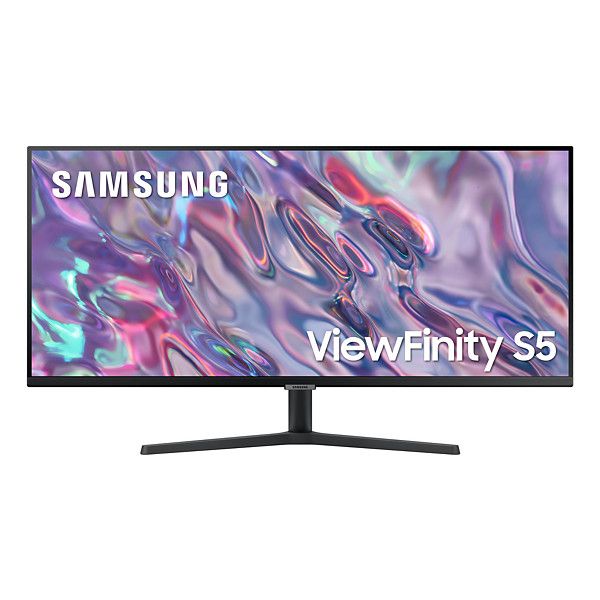
The Samsung Samsung ViewFinity S5 features a clean, minimalist design in a matte black finish that fits naturally into most workspaces. The slim bezels along the top and sides help the 34-inch ultrawide panel feel immersive without taking up unnecessary visual space.
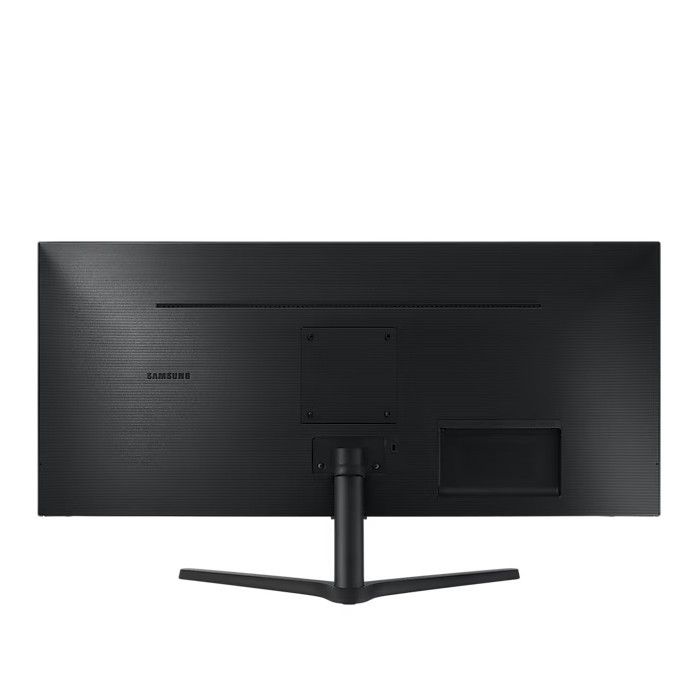
Around the back, the design remains simple and functional. Cable management is basic but helps keep your setup tidy, and the monitor includes VESA mount support for users who prefer a monitor arm or wall mounting solution.
The included stand is primarily plastic but feels stable for everyday use. It supports tilt adjustment for basic positioning, though more advanced ergonomic adjustments are not included.
Ergonomics
In terms of ergonomics, the ViewFinity S5 keeps things simple. Tilt adjustment is the only built-in option, with no height, swivel, or pivot functionality.
For most users, this will be sufficient for general productivity. However, those who require more flexibility for long working hours may benefit from pairing the monitor with a VESA-compatible arm.
Display Performance
Colour Accuracy & Vibrancy
The Samsung ViewFinity S5 uses a VA panel, which delivers strong contrast and deeper blacks compared to typical IPS displays. This makes it well-suited for everyday productivity and media consumption, with colours appearing balanced and natural for general use.
While it performs well within its category, it is not designed for professional colour-critical work, where more specialised displays would be preferable.
Resolution & Sharpness
With a resolution of 3440 × 1440 across a 34-inch ultrawide panel, the ViewFinity S5 provides a noticeably wider workspace compared to standard 16:9 monitors. This makes multitasking easier, allowing multiple windows to sit side-by-side without feeling cramped.
Text clarity is good for productivity tasks, and the extended horizontal space is particularly useful for spreadsheets, timelines, and multitasking workflows.
Motion Handling & Refresh Rate
With a 100Hz refresh rate, the ViewFinity S5 offers smoother motion than standard 60Hz displays. Scrolling, window movement, and general navigation feel more fluid, which can make a noticeable difference during long work sessions.
However, while the higher refresh rate improves responsiveness, this monitor is still primarily designed for productivity rather than fast-paced gaming
Key Features
Multitasking & Productivity
Office Work & Remote Setups
Wide Workspace for Spreadsheets and Timelines
Everyday Media and General Use
VA Panel Technology — Delivers strong contrast and deep blacks for everyday use
UltraWide QHD Resolution (3440 × 1440) — Expands horizontal workspace for efficient multitasking
100Hz Refresh Rate — Smoother scrolling and window movement compared to standard 60Hz displays
Connectivity — HDMI 2.0, DisplayPort 1.2
21:9 Ultrawide Format — Ideal for side-by-side applications without a dual-monitor setup
Eye Comfort Features — Flicker-free technology and reduced blue light for extended use
Who Should Buy the Samsung ViewFinity S5?
The Samsung LS34C500GAMXUE is best suited for users who want a wider workspace for productivity and multitasking:
Office Work & Remote Setups — The ultrawide 34-inch display makes it easier to manage documents, emails, and multiple applications at once.
Multitasking Professionals — The 21:9 aspect ratio allows you to work across several windows side-by-side without needing a dual-monitor setup.
Spreadsheet & Timeline Work — Ideal for users working with large datasets, editing timelines, or extended horizontal workflows.
General Everyday Use — A good option for browsing, streaming, and general productivity with added screen space.
Who Should Skip It?
If you require professional-grade colour accuracy, hardware calibration, or advanced connectivity like Thunderbolt, this monitor may not be the best fit. Similarly, users focused on high-end gaming or content creation should consider more specialised displays.
How Does It Compare to Similar Monitors?
Context matters. Here’s how the Samsung ViewFinity S5 (LS34C500GAMXUE) compares to other popular 34-inch ultrawide displays:
| Model | Key Specs | How It Compares |
|---|---|---|
| Samsung ViewFinity S5 | 34″, UWQHD (3440×1440), VA, 100Hz | Affordable ultrawide for everyday productivity |
| LG 34WP65C-B | 34″, UWQHD, IPS/VA (variant), curved, 160Hz | Better for gaming, higher refresh rate |
| Dell U3423WE | 34″, UWQHD, IPS, USB-C hub | Stronger connectivity and office-focused features |
| BenQ PD3420Q | 34″, UWQHD, IPS, factory calibrated | Better for colour accuracy and creative work |
While these alternatives each target slightly different users, the ViewFinity S5 stands out as a simple, cost-effective ultrawide solution. It focuses on delivering a wider workspace and smoother everyday performance without the added cost of premium features like advanced colour calibration or extensive USB-C connectivity.
Compared to higher-end options from Dell and BenQ, the S5 is less feature-rich but more accessible. Meanwhile, alternatives from LG may offer higher refresh rates for gaming, but the S5 remains a solid choice for users focused on productivity and multitasking.
Frequently Asked Questions
Is the Samsung ViewFinity S5 good for video editing?
The ViewFinity S5 can handle basic video editing and timeline work thanks to its ultrawide screen, which provides extra horizontal space. However, it is not designed for professional colour-critical editing, where more advanced, calibrated displays would be a better choice.
Does the Samsung LS34C500GAMXUE support HDR?
No, the LS34C500GAMXUE does not support HDR. It is designed primarily for productivity and general use rather than high dynamic range content.
What cables and ports does the Samsung ViewFinity S5 include?
The ViewFinity S5 (LS34C500GAMXUE) includes HDMI 2.0 and DisplayPort 1.2 connectivity. This covers most standard desktop and laptop setups.
Is the Samsung ViewFinity S5 compatible with Mac and Windows?
Yes, the LS34C500GAMXUE works with both macOS and Windows systems via HDMI and DisplayPort. It is a straightforward plug-and-play monitor for most setups.
How does the Samsung ViewFinity S5 compare to similar productivity monitors?
The ViewFinity S5 competes in the 34-inch ultrawide productivity category, offering a balance between screen size, resolution, and affordability. Compared to higher-end alternatives from Dell or BenQ, it provides fewer premium features but remains a practical option for users focused on multitasking and everyday productivity.
Final Verdict
The Samsung ViewFinity S5 (LS34C500GAMXUE) is a practical 34-inch ultrawide display that fits comfortably within Samsung’s productivity-focused lineup. It delivers a wider workspace and smoother everyday performance, making it a solid option for users who want to improve multitasking without moving into higher-end price tiers.
For office work, remote setups, and general productivity, the ultrawide 21:9 format makes a noticeable difference allowing multiple applications to sit side-by-side without the need for a dual-monitor setup.
That said, it comes with a few limitations. The resolution, while sharp for its class, is not as detailed as higher-end ultrawide displays, and the lack of advanced features such as USB-C connectivity or ergonomic adjustability means it is best suited for straightforward setups rather than premium workstation environments.
Overall, while it may not be the most feature-rich ultrawide on the market, it remains a strong choice for users who prioritize screen space, simplicity, and value over advanced features.
Introduction & First Impressions
Samsung continues to expand its productivity-focused lineup with the Samsung ViewFinity S5 a 34-inch UltraWide display designed for multitasking and everyday professional use. With model number LS34C500GAMXUE, this monitor reflects the growing demand for larger, more flexible screen space without stepping into premium workstation territory.
At first glance, the ViewFinity S5 makes a strong impression. Samsung’s design language is immediately recognizable clean lines, a slim profile, and a minimalist black finish that blends easily into modern office setups. The ultrawide format immediately stands out, offering a wider canvas that can replace multi-monitor setups for many users.
But design is only part of the story. The real value of a 34-inch ultrawide display lies in how effectively it improves workflow and productivity. That makes it important to evaluate not just how it looks, but how well it performs in everyday use.
In this review, we put the Samsung LS34C500GAMXUE through its paces assessing its display quality, multitasking capabilities, and overall usability. Whether you’re looking for an affordable ultrawide monitor or a more efficient workspace solution, this review will help you decide if the ViewFinity S5 is the right fit.
Full Technical Specifications
Before diving into performance, here’s a detailed breakdown of the Samsung ViewFinity S5 (LS34C500GAMXUE):
| Specification | Details |
|---|---|
| Model Number | LS34C500GAMXUE |
| Screen Size | 34″ |
| Panel Technology | VA* |
| Resolution | 3440 × 1440 (UltraWide QHD / UWQHD) |
| Refresh Rate | 100Hz |
| Response Time | 5ms (GtG) |
| Brightness | Up to 300 nits |
| HDR Support | Not supported |
| Connectivity | HDMI 2.0, DisplayPort 1.2 |
| Colour | Black |
*Panel type may vary slightly by region/configuration verify if needed.
On paper, the ViewFinity S5 focuses on productivity and multitasking, with its ultrawide resolution providing significantly more horizontal workspace compared to standard 16:9 displays.
Design & Build Quality
The Samsung Samsung ViewFinity S5 features a clean, minimalist design in a matte black finish that fits naturally into most workspaces. The slim bezels along the top and sides help the 34-inch ultrawide panel feel immersive without taking up unnecessary visual space.
Around the back, the design remains simple and functional. Cable management is basic but helps keep your setup tidy, and the monitor includes VESA mount support for users who prefer a monitor arm or wall mounting solution.
The included stand is primarily plastic but feels stable for everyday use. It supports tilt adjustment for basic positioning, though more advanced ergonomic adjustments are not included.
Ergonomics
In terms of ergonomics, the ViewFinity S5 keeps things simple. Tilt adjustment is the only built-in option, with no height, swivel, or pivot functionality.
For most users, this will be sufficient for general productivity. However, those who require more flexibility for long working hours may benefit from pairing the monitor with a VESA-compatible arm.
Display Performance
Colour Accuracy & Vibrancy
The Samsung ViewFinity S5 uses a VA panel, which delivers strong contrast and deeper blacks compared to typical IPS displays. This makes it well-suited for everyday productivity and media consumption, with colours appearing balanced and natural for general use.
While it performs well within its category, it is not designed for professional colour-critical work, where more specialised displays would be preferable.
Resolution & Sharpness
With a resolution of 3440 × 1440 across a 34-inch ultrawide panel, the ViewFinity S5 provides a noticeably wider workspace compared to standard 16:9 monitors. This makes multitasking easier, allowing multiple windows to sit side-by-side without feeling cramped.
Text clarity is good for productivity tasks, and the extended horizontal space is particularly useful for spreadsheets, timelines, and multitasking workflows.
Motion Handling & Refresh Rate
With a 100Hz refresh rate, the ViewFinity S5 offers smoother motion than standard 60Hz displays. Scrolling, window movement, and general navigation feel more fluid, which can make a noticeable difference during long work sessions.
However, while the higher refresh rate improves responsiveness, this monitor is still primarily designed for productivity rather than fast-paced gaming
Key Features
Multitasking & Productivity
Office Work & Remote Setups
Wide Workspace for Spreadsheets and Timelines
Everyday Media and General Use
VA Panel Technology — Delivers strong contrast and deep blacks for everyday use
UltraWide QHD Resolution (3440 × 1440) — Expands horizontal workspace for efficient multitasking
100Hz Refresh Rate — Smoother scrolling and window movement compared to standard 60Hz displays
Connectivity — HDMI 2.0, DisplayPort 1.2
21:9 Ultrawide Format — Ideal for side-by-side applications without a dual-monitor setup
Eye Comfort Features — Flicker-free technology and reduced blue light for extended use
Who Should Buy the Samsung ViewFinity S5?
The Samsung LS34C500GAMXUE is best suited for users who want a wider workspace for productivity and multitasking:
Office Work & Remote Setups — The ultrawide 34-inch display makes it easier to manage documents, emails, and multiple applications at once.
Multitasking Professionals — The 21:9 aspect ratio allows you to work across several windows side-by-side without needing a dual-monitor setup.
Spreadsheet & Timeline Work — Ideal for users working with large datasets, editing timelines, or extended horizontal workflows.
General Everyday Use — A good option for browsing, streaming, and general productivity with added screen space.
Who Should Skip It?
If you require professional-grade colour accuracy, hardware calibration, or advanced connectivity like Thunderbolt, this monitor may not be the best fit. Similarly, users focused on high-end gaming or content creation should consider more specialised displays.
How Does It Compare to Similar Monitors?
Context matters. Here’s how the Samsung ViewFinity S5 (LS34C500GAMXUE) compares to other popular 34-inch ultrawide displays:
| Model | Key Specs | How It Compares |
|---|---|---|
| Samsung ViewFinity S5 | 34″, UWQHD (3440×1440), VA, 100Hz | Affordable ultrawide for everyday productivity |
| LG 34WP65C-B | 34″, UWQHD, IPS/VA (variant), curved, 160Hz | Better for gaming, higher refresh rate |
| Dell U3423WE | 34″, UWQHD, IPS, USB-C hub | Stronger connectivity and office-focused features |
| BenQ PD3420Q | 34″, UWQHD, IPS, factory calibrated | Better for colour accuracy and creative work |
While these alternatives each target slightly different users, the ViewFinity S5 stands out as a simple, cost-effective ultrawide solution. It focuses on delivering a wider workspace and smoother everyday performance without the added cost of premium features like advanced colour calibration or extensive USB-C connectivity.
Compared to higher-end options from Dell and BenQ, the S5 is less feature-rich but more accessible. Meanwhile, alternatives from LG may offer higher refresh rates for gaming, but the S5 remains a solid choice for users focused on productivity and multitasking.
Frequently Asked Questions
Is the Samsung ViewFinity S5 good for video editing?
The ViewFinity S5 can handle basic video editing and timeline work thanks to its ultrawide screen, which provides extra horizontal space. However, it is not designed for professional colour-critical editing, where more advanced, calibrated displays would be a better choice.
Does the Samsung LS34C500GAMXUE support HDR?
No, the LS34C500GAMXUE does not support HDR. It is designed primarily for productivity and general use rather than high dynamic range content.
What cables and ports does the Samsung ViewFinity S5 include?
The ViewFinity S5 (LS34C500GAMXUE) includes HDMI 2.0 and DisplayPort 1.2 connectivity. This covers most standard desktop and laptop setups.
Is the Samsung ViewFinity S5 compatible with Mac and Windows?
Yes, the LS34C500GAMXUE works with both macOS and Windows systems via HDMI and DisplayPort. It is a straightforward plug-and-play monitor for most setups.
How does the Samsung ViewFinity S5 compare to similar productivity monitors?
The ViewFinity S5 competes in the 34-inch ultrawide productivity category, offering a balance between screen size, resolution, and affordability. Compared to higher-end alternatives from Dell or BenQ, it provides fewer premium features but remains a practical option for users focused on multitasking and everyday productivity.
Final Verdict
The Samsung ViewFinity S5 (LS34C500GAMXUE) is a practical 34-inch ultrawide display that fits comfortably within Samsung’s productivity-focused lineup. It delivers a wider workspace and smoother everyday performance, making it a solid option for users who want to improve multitasking without moving into higher-end price tiers.
For office work, remote setups, and general productivity, the ultrawide 21:9 format makes a noticeable difference allowing multiple applications to sit side-by-side without the need for a dual-monitor setup.
That said, it comes with a few limitations. The resolution, while sharp for its class, is not as detailed as higher-end ultrawide displays, and the lack of advanced features such as USB-C connectivity or ergonomic adjustability means it is best suited for straightforward setups rather than premium workstation environments.
Overall, while it may not be the most feature-rich ultrawide on the market, it remains a strong choice for users who prioritize screen space, simplicity, and value over advanced features.