
Uncategorized
Samsung Viewfinity S6 (LS34C650UAMXUE)
Introduction & First Impressions
Samsung continues to strengthen its position in the monitor market with the Viewfinity S6 a 34-inch ultrawide display aimed at creative professionals and productivity-focused users. With the model number LS34C650UAMXUE, this monitor is designed to meet the growing demand for a capable ultrawide WQHD productivity display that balances visual quality with essential features.
At first glance, the Viewfinity S6 makes a confident impression. Samsung’s industrial design language is immediately recognizable clean lines, a slim profile, and a minimalist black finish that fits naturally into modern workspaces. However, design alone isn’t enough. The real question is whether this 34-inch panel delivers the performance that today’s users actually need.
In this review, we put the Samsung LS34C650UAMXUE through its paces from out-of-the-box colour accuracy to real-world responsiveness and connectivity. Whether you’re searching for an affordable Viewfinity S6 or a reliable ultrawide for productivity and creative work, read on to see how it performs.
Full Technical Specifications
Before diving into performance, here’s a complete breakdown of the Samsung Viewfinity S6’s specifications:
| Specification | Details |
|---|---|
| Model Number | LS34C650UAMXUE |
| Monitor Type | Samsung Viewfinity S6 |
| Screen Size | 34″ |
| Panel Technology | IPS |
| Resolution | 3440 × 1440 (WQHD Ultrawide) |
| Refresh Rate | 100Hz |
| Response Time | 5ms (GtG) |
| Brightness | 300 nits |
| HDR Support | None |
| Connectivity | HDMI 2.0, DisplayPort 1.2, USB-C (90W PD), USB Hub |
| Colour | Black |
| Category | Ultrawide WQHD (5K) |
| Segment | HRM (Viewfinity S6) |
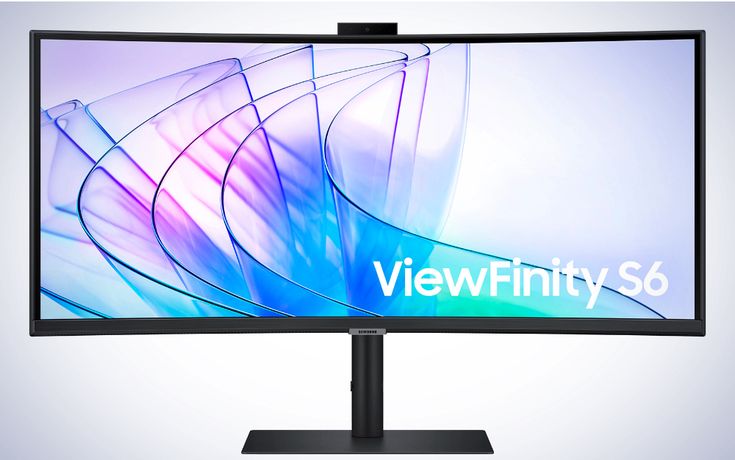
Design & Build Quality
The Samsung Viewfinity S6 arrives in a clean black finish that aligns with Samsung’s modern design language. Its slim bezels especially along the top and sides give the 34-inch ultrawide panel a more immersive feel without dominating your workspace. Around the back, you’ll find a tidy layout with integrated cable management and a VESA-compatible mount for users who prefer monitor arms or wall setups.
The included stand uses a plastic exterior but feels stable in everyday use, with minimal wobble during typing or desk movement. Overall build quality is solid for this category and in line with what you’d expect from Samsung’s mid-range productivity lineup.
Ergonomics
For long working sessions, the Viewfinity S6 offers practical ergonomic adjustments. Height and tilt adjustments are included, allowing you to position the display comfortably for extended use. While it doesn’t support pivot (portrait rotation), this is typical for ultrawide monitors of this size.
Combined with its wide screen real estate and clean cable management, the S6 remains a functional choice for desk-based productivity setups.
Display Performance
Colour Accuracy & Vibrancy
The IPS panel at the core of the Samsung Viewfinity S6 delivers solid colour reproduction with wide viewing angles, making it a dependable option for both productivity and general creative tasks. Out of the box, colours appear well-balanced and consistent, though it stops short of the factory-calibrated precision required for highly colour-critical professional work.
Resolution & Sharpness
With a resolution of 3440 × 1440 across a 34-inch ultrawide panel, the Viewfinity S6 provides a good level of detail and workspace flexibility. Text appears sharp enough for everyday productivity, while the wider aspect ratio allows for efficient multitasking with multiple windows side by side. While not as dense as higher-resolution panels, it strikes a practical balance between clarity and performance.
Motion Handling & Refresh Rate
The Viewfinity S6 supports a refresh rate of up to 100Hz, which results in smoother scrolling and more fluid on-screen movement compared to standard 60Hz displays. For productivity and light creative workflows, this added smoothness enhances the overall user experience, even if it’s not specifically targeted at high-performance gaming.
Key Features
Light Video Editing
Graphic Design (General Use)
Content Creation
Multitasking and Productivity
IPS Panel Technology — Delivers consistent colours and wide viewing angles for everyday productivity and creative tasks
Ultrawide WQHD Resolution (3440 × 1440) — Provides ample screen space for multitasking and improved workflow efficiency
Up to 100Hz Refresh Rate — Smoother scrolling and improved on-screen fluidity compared to standard 60Hz displays
Connectivity — HDMI 2.0, DisplayPort 1.2, USB-C (90W Power Delivery), and USB hub support
Balanced Colour Performance — Good out-of-the-box colour suitable for general creative work
Eye Comfort Features — Flicker-free technology and blue light reduction help minimize eye strain during long sessions
Who Should Buy the Samsung Viewfinity S6?
The Samsung LS34C650UAMXUE is a strong choice if you fall into one of the following categories:
Content Creators (General Use) — The ultrawide 3440 × 1440 resolution provides ample screen space for timelines, editing panels, and multitasking across creative applications.
Graphic Designers — The IPS panel delivers consistent colours and wide viewing angles, making it suitable for general design work and digital content creation.
Office Professionals & Multitaskers — The 34-inch ultrawide format is ideal for running multiple windows side by side, significantly improving workflow efficiency without needing a dual-monitor setup.
Remote Workers & Laptop Users — USB-C connectivity with 90W power delivery allows for a clean single-cable setup, making it easy to connect and charge compatible laptops.
On the other hand, if you require high-end colour accuracy for professional printing, hardware calibration support, or Thunderbolt connectivity, this monitor may not be the best fit.
How Does It Compare to Similar Monitors?
Context is important when choosing a monitor. The Samsung Viewfinity S6 sits in the 34-inch ultrawide productivity category, so it is best compared with both ultrawide and high-quality 27-inch professional displays.
| Model | Key Specs | vs Samsung Viewfinity S6 |
|---|---|---|
| Samsung Viewfinity S6 (LS34C650UAMXUE) | 34″, IPS, 3440×1440, up to 100Hz, USB-C | Ultrawide workspace advantage for multitasking |
| LG 27UK850-W | 27″, 4K IPS, USB-C | Higher pixel density, but smaller workspace |
| Dell UltraSharp U2722D | 27″, QHD IPS, USB-C | Strong colour accuracy and professional tuning |
| BenQ PD2725U | 27″, 4K IPS, Thunderbolt | Better for Mac users and colour-critical workflows |
Final Take
The Samsung Viewfinity S6 stands out mainly because of its ultrawide format, which significantly improves productivity by allowing multiple windows to be used side by side.
However, if your priority is maximum sharpness or professional colour accuracy, 27-inch 4K monitors from Dell or BenQ may be a better fit.
Frequently Asked Questions
Is the Samsung Viewfinity S6 good for video editing?
Yes, the Samsung Viewfinity S6 is suitable for light to moderate video editing. Its IPS panel and ultrawide 3440 × 1440 resolution provide ample workspace for timelines, editing tools, and multitasking. However, it is not designed for high-end colour grading work.
Does the Samsung LS34C650UAMXUE support HDR?
No, the LS34C650UAMXUE does not include HDR support. Users requiring HDR performance should consider higher-end displays with dedicated HDR certification.
What cables and ports does the Samsung Viewfinity S6 include?
The Samsung Viewfinity S6 includes HDMI 2.0, DisplayPort 1.2, USB-C with up to 90W power delivery, and a built-in USB hub. This makes it well-suited for laptop docking and clean single-cable setups.
Is the Samsung Viewfinity S6 compatible with Mac and Windows?
Yes, the monitor is fully compatible with both macOS and Windows systems via HDMI, DisplayPort, and USB-C. It works well with modern laptops, including MacBooks that support USB-C video output.
How does the Samsung Viewfinity S6 compare to similar productivity monitors?
The Samsung Viewfinity S6 competes in the ultrawide productivity category, where its main advantage is screen real estate. Compared to 27-inch 4K monitors from brands like Dell or LG, it prioritizes multitasking space over maximum pixel density, making it better suited for workflow efficiency rather than ultra-high-resolution detail work.
Final Verdict
The Samsung Viewfinity S6 (LS34C650UAMXUE) is a well-designed 34-inch ultrawide productivity monitor that focuses on delivering a practical and efficient workspace rather than chasing high-end specifications. With its 3440 × 1440 resolution, IPS panel, and up to 100Hz refresh rate, it offers a balanced experience for everyday productivity and general creative tasks.
For professionals and power users who value screen real estate, multitasking efficiency, and USB-C convenience, the Viewfinity S6 is a strong option in the mid-range ultrawide category.
It competes with similarly priced monitors from LG, Dell, and ASUS, and while it does not lead in areas like colour-critical performance or premium build features, it holds its ground well as a productivity-focused display.
Rather than being the “best monitor on the market,” it is more accurately described as a reliable and well-rounded ultrawide for productivity-focused users who prioritise workflow over extreme specifications.