
Uncategorized
Samsung Viewfinity S6 (LS34C650VAMXUE)
Introduction & First Impressions
Samsung continues to expand its Viewfinity lineup with the S6 series a range of ultrawide monitors designed for productivity-focused users and modern workflows. The 34-inch variant, including models like the LS34C650VAMXUE, targets users who want a wider workspace without stepping into premium price territory.
At first glance, the Viewfinity S6 makes a strong impression. Samsung’s design language is immediately recognizable clean lines, a slim profile, and a minimalist black finish that fits naturally into modern workspaces. However, design alone isn’t enough. The real question is whether this ultrawide panel delivers the performance that today’s users actually need.
In this review, we take a closer look at the Samsung Viewfinity S6 examining its display quality, responsiveness, and connectivity options. Whether you’re looking for a reliable ultrawide for multitasking or a practical upgrade for your workspace, read on to see how it performs.
Full Technical Specifications
Before diving into performance, here’s a complete breakdown of the Samsung Viewfinity S6’s specifications:
| Specification | Details |
|---|---|
| Model Number | LS34C650VAMXUE |
| Monitor Type | Samsung Viewfinity S6 |
| Screen Size | 34″ |
| Panel Technology | IPS |
| Resolution | 3440 × 1440 (WQHD Ultrawide) |
| Refresh Rate | Up to 100Hz |
| Response Time | 5ms (GtG) |
| Brightness | 300 nits |
| HDR Support | No |
| Connectivity | HDMI 2.0, DisplayPort 1.2, USB-C (90W PD), USB Hub |
| Colour | Black |
| Category | Ultrawide WQHD |
| Segment | Viewfinity S6 Series |
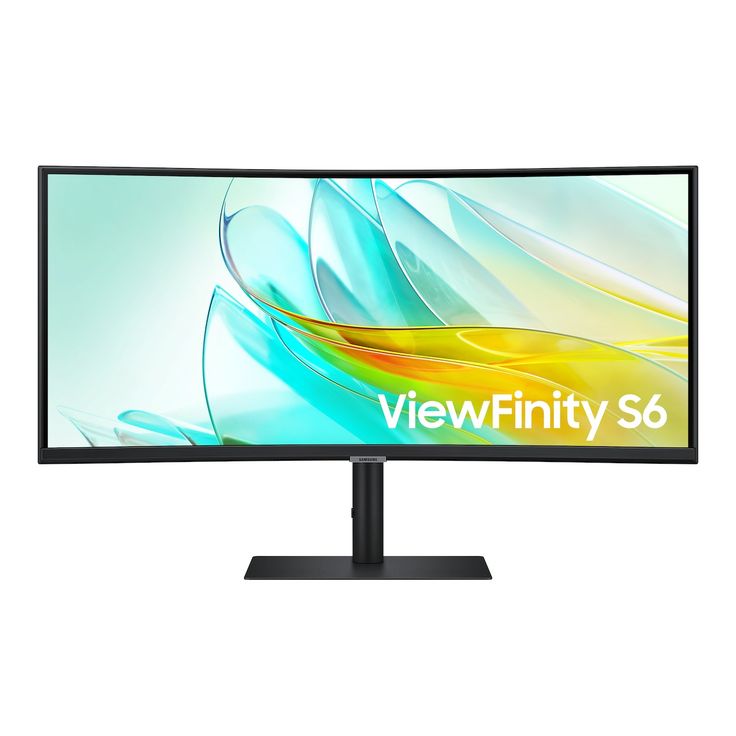
Design & Build Quality
The Samsung Viewfinity S6 S65UC features a clean, minimalist design finished in Samsung’s signature matte black. The slim bezels along the top and sides help the 34-inch ultrawide panel feel more immersive without taking up unnecessary visual space on your desk.
One of the standout design elements is its 1000R curvature, which wraps the display slightly around your field of view. This not only enhances immersion but also makes it easier to view content across the wide 21:9 screen without excessive head movement.
Around the back, the monitor includes integrated cable management and a VESA-compatible mount, making it easy to keep your setup clean or transition to a monitor arm if needed.
The included stand features a plastic exterior but feels stable in everyday use, with minimal wobble during typing or desk movement. Overall build quality is solid and consistent with what you’d expect from Samsung’s mid-range productivity lineup.
Ergonomics
For users spending long hours at a desk, the Viewfinity S6 offers practical ergonomic adjustments. The stand supports height, tilt, and swivel adjustments, allowing you to position the display comfortably for extended sessions.
As expected for a curved ultrawide monitor, pivot (portrait rotation) is not supported, but the available adjustments are sufficient for most desk setups. Combined with its wide screen and built-in cable management, the S6 remains a functional and workspace-friendly display.
Display Performance
Colour Accuracy & Vibrancy
The VA panel at the core of the Samsung Viewfinity S6 S65UC delivers strong contrast and solid colour performance for everyday use. With a high contrast ratio of around 3000:1, it produces deeper blacks and more noticeable depth compared to typical IPS panels. Colours are vibrant and consistent for general productivity and content creation, though it is not tuned for colour-critical professional work.
Resolution & Sharpness
With a resolution of 3440 × 1440 (Ultra-WQHD) across a 34-inch curved panel, the Viewfinity S6 provides a good balance between clarity and usable workspace. Text appears sharp for day-to-day tasks, while the ultrawide 21:9 aspect ratio offers significantly more room for multitasking, timelines, and side-by-side applications. While it doesn’t match the pixel density of 4K displays, it prioritizes workflow efficiency over sheer sharpness.
Motion Handling & Refresh Rate
The monitor supports a refresh rate of up to 100Hz, delivering smoother scrolling and improved responsiveness compared to standard 60Hz displays. Combined with AMD FreeSync support, motion appears fluid during everyday use and light gaming, making it a versatile option beyond pure productivity tasks.
Key Features
Light Video Editing
Graphic Design (General Use)
Content Creation
Multitasking and Productivity
VA Panel with High Contrast — Delivers deep blacks and a strong 3000:1 contrast ratio for improved visual depth
Ultra-WQHD Resolution (3440 × 1440) — Expansive 21:9 workspace ideal for multitasking and timeline-based workflows
Up to 100Hz Refresh Rate — Smoother scrolling and more fluid on-screen motion compared to standard 60Hz displays
Advanced Connectivity Hub — HDMI 2.0, DisplayPort 1.2, USB-C with 90W power delivery, Ethernet (LAN), and USB hub
Built-in KVM Switch — Control multiple devices with a single keyboard and mouse
Integrated Speakers — Built-in stereo audio for everyday use
Eye Comfort Features — Flicker-free technology and blue light reduction help reduce eye strain
How Does It Compare to Similar Monitors?
Context is important when choosing a monitor. The Samsung Viewfinity S6 S65UC sits in the 34-inch ultrawide productivity category, where it competes with both ultrawide displays and high-quality 27-inch professional monitors.
| Model | Key Specs | vs Samsung Viewfinity S6 |
|---|---|---|
| Samsung Viewfinity S6 S65UC (LS34C650) | 34″, VA, 3440×1440, 100Hz, USB-C, KVM, LAN | Best for multitasking and all-in-one connectivity |
| LG 27UK850-W | 27″, 4K IPS, USB-C | Sharper image, but less workspace and no ultrawide advantage |
| Dell UltraSharp U2722D | 27″, QHD IPS, USB-C | Better colour tuning and ergonomics |
| BenQ PD2725U | 27″, 4K IPS, Thunderbolt | Ideal for Mac users and colour-critical workflows |
Final Take
The Samsung Viewfinity S6 stands out for its ultrawide form factor and built-in productivity features, including USB-C connectivity, KVM functionality, and an integrated hub with Ethernet. These features make it a strong choice for users who want a clean, single-cable workspace and efficient multitasking.
However, if your priority is maximum sharpness or professional-grade colour accuracy, 27-inch 4K monitors from Dell or BenQ may be more suitable.
Frequently Asked Questions
Is the Samsung Viewfinity S6 good for video editing?
Yes the Samsung Viewfinity S6 S65UC is suitable for light to moderate video editing. Its ultrawide 3440 × 1440 resolution provides plenty of space for timelines and editing tools, while the VA panel offers strong contrast. However, it is not designed for colour-critical professional grading work.
Does the Samsung LS34C650VAMXUE support HDR?
Yes, the LS34C650VAMXUE supports HDR10. However, its HDR performance is limited due to its brightness and lack of advanced dimming features, so the improvement in HDR content is modest.
What cables and ports does the Samsung Viewfinity S6 include?
The monitor includes HDMI 2.0, DisplayPort 1.2, USB-C with up to 90W power delivery, Ethernet (LAN), and a built-in USB hub. It also features a KVM switch, allowing multiple devices to share the same keyboard and mouse.
Is the Samsung Viewfinity S6 compatible with Mac and Windows?
Yes, it is fully compatible with both macOS and Windows systems via HDMI, DisplayPort, and USB-C. It works especially well as a single-cable solution for modern laptops, including MacBooks that support USB-C display output.
How does the Samsung Viewfinity S6 compare to similar productivity monitors?
The Viewfinity S6 competes in the ultrawide productivity category, where its main strengths are multitasking space and built-in connectivity features like USB-C, KVM, and Ethernet. Compared to 27-inch 4K monitors, it prioritizes workflow efficiency over maximum pixel density or colour precision
Final Verdict
The Samsung Viewfinity S6 (LS34C650VAMXUE) is a well-designed 34-inch ultrawide monitor focused on productivity and everyday creative workflows rather than high-end professional colour work. With its 3440 × 1440 resolution, VA panel, and up to 100Hz refresh rate, it delivers a balanced experience for users who prioritise screen space and efficiency.
Its strongest appeal lies in its ultrawide format and built-in productivity features, including USB-C connectivity with power delivery, a KVM switch, and integrated hub functionality. These make it particularly well-suited for modern laptop-based setups and multitasking-heavy workflows.
Compared to alternatives from LG, Dell, and ASUS, the Viewfinity S6 competes strongly in terms of value and functionality, especially for users who prefer a clean, single-cable workspace over maximum resolution or colour-critical performance.
Rather than being the “best monitor on the market,” it is more accurately described as a capable and well-rounded ultrawide productivity display for users who value workflow efficiency over extreme specifications.