
Uncategorized
Huawei IdeaHub B3 IHB3-65SA 65″ 4K Smart Interactive Whiteboard & Collaboration Display Blog
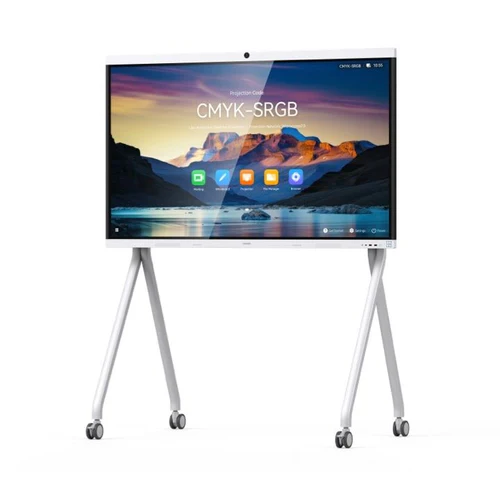
Huawei IdeaHub B3 IHB3-65SA 65″ 4K Smart Interactive Whiteboard & Collaboration Display Review in Kenya
Huawei IdeaHub B3 IHB3-65SA 65″ 4K Smart Interactive Whiteboard & Collaboration Display Review in Kenya
As Kenyan workplaces and educational institutions modernize their collaboration environments, traditional whiteboards and projector setups are increasingly replaced by integrated interactive displays that support real-time teamwork and hybrid communication.
The Huawei IdeaHub B3 IHB3-65SA, a 65-inch 4K interactive whiteboard and collaboration display, is engineered to meet the demands of structured corporate meetings, hybrid classrooms, and dynamic training sessions. This review examines its actual performance and practical value for Kenyan enterprises and institutions.
Display & Visual Performance — 65″ 4K UHD
With a 65-inch 4K UHD (3840 × 2160) panel, the IdeaHub B3 IHB3-65SA delivers crisp resolution that enhances visibility for:
Detailed spreadsheets and data dashboards
Engineering and architectural drawings
High-definition video conferencing feeds
Multi-window content during hybrid sessions
High pixel density across the display surface improves content legibility even for participants seated at the back of a small-to-medium meeting room. In structured corporate and academic environments, clarity directly influences participant engagement and information retention.
The anti-glare screen further boosts visibility in lit environments — an important advantage in Kenyan offices and classrooms that rely heavily on natural light.
Interaction & Annotation — Real-Time Responsive Writing
Where traditional displays fall short, the IdeaHub B3 excels in responsive interaction:
Multi-touch input for collaborative annotation
Low-latency writing that feels natural and fluid
Simultaneous multi-user drawing for team activities
Fast, accurate input is critical in live brainstorming sessions, technical workshops, and interactive lectures. Lag or touch inaccuracy can disrupt workflow — especially in Kenya’s corporate training rooms or lecture halls where collective engagement matters.
This makes the IdeaHub B3 a versatile tool for group collaboration and interactive teaching scenarios.
Integrated Collaboration — Built-In Conferencing & Sharing
Modern collaboration displays must go beyond touch — they must integrate conferencing hardware and software so teams can connect seamlessly without additional devices.
The IdeaHub B3 includes:
Professional-grade built-in cameras
Microphone arrays optimized for meeting acoustics
High-fidelity speakers for clear audio
Wireless screen mirroring for multi-device sharing
This all-in-one architecture simplifies meeting setup and reduces dependency on external hardware such as USB cameras, speaker systems, or cables. For hybrid work environments, this translates into faster session starts and fewer technical disruptions.
Wireless Connectivity & Cross-Device Collaboration
The IHB3-65SA supports wireless content sharing from laptops, tablets, and smartphones, enabling:
Quick hand-offs between presenters
Multi-participant content displays
Reduced cable clutter
This capability is especially valuable in environments where multiple users contribute content in rapid succession — for example, in training rooms, brainstorming workshops, and collaborative classroom settings.
Performance & Reliability in High-Use Environments
Interactive displays are expected to handle concurrent tasks — such as annotation, conferencing, and screen sharing — without performance dips.
The IdeaHub B3’s internal architecture is built for:
Stable multi-task operation
Responsive touch and gesture handling
Consistent conferencing quality
This ensures that meetings and lessons proceed without frustrating lag — an important factor for Kenyan enterprises and institutions that run frequent structured sessions.
Use Cases in Kenya — Enterprise & Education
The IdeaHub B3 IHB3-65SA is particularly well-suited for:
Corporate Environments
Boardroom presentations and strategy sessions
Cross-functional collaboration workshops
Project reviews with remote stakeholders
Educational Settings
University lecture halls and seminar rooms
Interactive classroom instruction
Teacher-led group activities
Training & Workshop Centers
Professional development sessions
Corporate training programs
Technical certification classes
Unlike consumer interactive TVs, which are designed for casual use, the IdeaHub B3 is built for high-frequency, structured collaboration.
Installation & Deployment Considerations in Kenya
Proper infrastructure planning ensures that the display delivers its full value:
Room dimensions & viewing distance — Ensure participants have clear sightlines.
Mounting options — Wall mounts or mobile stands based on space.
Network connectivity — Reliable Wi-Fi or wired LAN for conferencing and sharing.
Power stability — Surge-protected supply in institutional environments.
Structured installation leads to consistent user experiences and long-term reliability.
IdeaHub B3 vs Traditional Projector + Whiteboard Setups
| Feature | Huawei IdeaHub B3 IHB3-65SA | Traditional Projector + Whiteboard |
|---|---|---|
| Native Resolution | 4K UHD | Often lower |
| Interactive Input | Multi-touch + annotation | None |
| Integrated Conferencing | Built-in | External devices required |
| Cable Dependency | Minimal | High |
| Setup Time | Short | Longer |
| Maintenance Needs | Low | Bulb replacement & calibration |
For Kenyan businesses and institutions scaling their collaboration infrastructure, integrated displays offer superior long-term value and user experience.
Is the Huawei IdeaHub B3 Worth the Investment in Kenya?
For occasional presentations or basic display needs, a standard large-screen TV or projector may suffice. However, for organizations with regular collaborative workflows — especially hybrid work sessions, interactive training, or hybrid classroom models — the IdeaHub B3 moves from being a “nice-to-have” to a strategic productivity tool.
Benefits include:
Faster session starts
Reduced tech setup complexity
Higher participant engagement
Simplified hardware ecosystem
Evaluated as collaboration infrastructure rather than a simple display, its value becomes clearer.