Uncategorized
Samsung Flip Pro WM65B 65″ 4K Interactive Touch Display Blog
Samsung Flip Pro WM65B 65″ 4K Interactive Touch Display Review
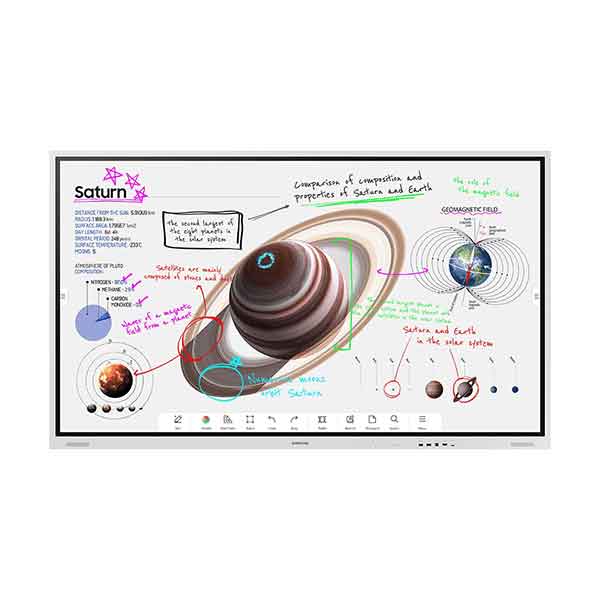
Samsung Flip Pro WM65B 65″ 4K Interactive Touch Display Review in Kenya
Modern collaboration and blended learning environments require more than static screens. The Samsung Flip Pro WM65B is a 65-inch 4K UHD interactive touch display designed to transform boardrooms, meeting spaces, and classrooms across Kenya into dynamic collaboration hubs.
Blending high-resolution visuals with responsive multi-touch technology and versatile connectivity, the Flip Pro WM65B delivers an all-in-one interactive experience optimized for hybrid work, digital instruction, and collaborative workshops.
Below, we unpack its real-world capabilities for Kenyan enterprises and institutions.
Display & Visual Clarity – Why 65″ 4K UHD Matters
At 65 inches with native 4K UHD resolution (3840 × 2160), the Samsung Flip Pro WM65B ensures clear rendering of:
Data-rich spreadsheets and dashboards
Presentation visuals and multimedia content
Fine-detail engineering drawings and designs
Video conferencing feeds with remote participants
The high pixel density and generous viewing angles support comfortable visibility from multiple seating positions in small-to-medium corporate meeting rooms and classrooms alike. The included anti-glare coating improves visibility in environments with ambient light — common in Kenyan corporate offices and lecture halls.
Multi-Touch Interaction & Natural Writing Experience
Beyond just a display, the Flip Pro elevates interactivity with:
Industry-leading 26 ms latency and 2,048 pressure points for smooth, natural writing
Up to 20 simultaneous touch points, enabling multiple users to interact at once
Pen & brush modes, quick tool palettes, and flexible erase gestures
This responsive touch experience mimics pen-on-paper feel, making it ideal for brainstorming, ideation sessions, and interactive teaching activities where participants contribute ideas directly on the screen. These low-latency interactions reduce frustration and maintain flow during high-impact meetings and lessons.
Integrated Collaboration & Hybrid Connectivity
Samsung designed the Flip Pro WM65B to simplify collaboration in hybrid and digital settings:
Wireless screen sharing via SmartView+ and AirPlay 2
3-in-1 USB-C port supporting screen mirroring, touch control, and up to 15 W device charging
Multiple HDMI, USB, DisplayPort, LAN, and RS232 ports for flexible connectivity
Front control panel for quick access and device management
Wireless sharing enables participants to present from laptops, tablets, or phones without cumbersome cabling — a major advantage in collaborative meetings and multi-device classrooms
Performance, Security & Software Ecosystem
The Flip Pro runs on Samsung’s embedded Tizen OS, offering a responsive interface and support for interactive tools. The system combines:
Robust internal storage and performance
Built-in annotation and whiteboard apps
Optional enterprise apps like MimioConnect for blended learning
Samsung Knox security for secure access to content and network resources
This software ecosystem supports structured collaboration scenarios and can integrate with productivity workflows across organizations and institutions.
.
Wireless Collaboration & Group Engagement
SmartView+ on the Flip Pro WM65B enables wireless connectivity for up to 50 devices simultaneously, with support for multi-viewing multiple screens at once. This capability:
Enhances group learning and real-time participation
Supports multi-presenter environments in meetings
Reduces time spent connecting devices manually
For hybrid work teams and interactive classes in Kenya, this wide-device support boosts inclusivity and efficiency.
Use Cases in Kenya – Business & Education
The Samsung Flip Pro WM65B is particularly effective for:
Enterprise Workspaces
Executive presentations and cross-department workshops
Hybrid team meetings with remote participants
Client pitches and visual planning sessions
Educational Institutions
Interactive classrooms and blended learning environments
Team-based assignments and student engagement activities
Lecture delivery with annotation and multimedia support
Training & Development Centers
Professional upskilling and certification programs
Collaborative problem-solving workshops
As an interactive display built for high-frequency use, it outperforms consumer-grade touchscreen TVs in structured organizational settings.
Installation & Deployment Considerations in Kenya
Before deploying the Flip Pro WM65B, plan for:
Room layout and viewing distances
Secure wall mounting (VESA-compatible) or mobile stand options
Reliable power supply with surge protection
Network connectivity for wireless sharing and online features
Proper setup ensures optimal performance and long-term reliability in Kenyan workplaces and lecture halls.
Samsung Flip Pro vs Traditional Displays
| Feature | Samsung Flip Pro WM65B | Standard 4K TV / Projector |
|---|---|---|
| Native 4K UHD | ✅ | Varies |
| Multi-Touch Interactivity | Up to 20 points | ✘ |
| Wireless Collaboration | SmartView+, AirPlay | Limited |
| Built-In Whiteboarding | ✅ | ✘ |
| Connectivity | Multi-port + USB-C | Limited ports |
| Hybrid Work Support | Integrated | External devices needed |
In comparison with legacy displays, the Flip Pro’s feature set is better aligned for enterprise and classroom workflows that demand performance and flexibility.
Is the Samsung Flip Pro WM65B Worth It in Kenya?
For occasional presentations, a standard TV might suffice. But for organizations that value structured collaboration, hybrid meetings, and interactive learning, the Samsung Flip Pro WM65B becomes a strategic asset. Benefits include:
Reduced setup time
Enhanced engagement and participation
Simplified device connectivity
Scalability across teams and classes
Viewed as core collaboration infrastructure rather than an accessory, the ROI becomes clear — particularly for Kenyan enterprises and institutions investing in digital transformation.