Uncategorized
Huawei IdeaShare Key (USB-A) Wireless Screen Sharing Dongle for IdeaHub Blog
Huawei IdeaShare Key (USB-A) Wireless Screen Sharing Dongle for IdeaHub – Review
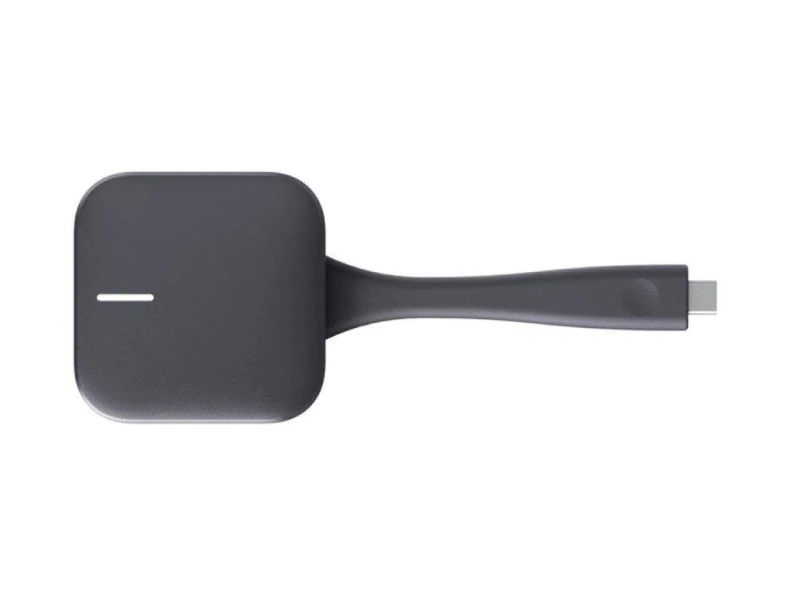
Huawei IdeaShare Key (USB-A) Wireless Screen Sharing Dongle Review in Kenya
In hybrid meeting rooms, classrooms, and collaborative workspaces across Kenya, seamless screen sharing is foundational to productivity. Cable-dependent sharing slows meetings and introduces compatibility issues between devices. The Huawei IdeaShare Key (USB-A) — a compact wireless screen sharing dongle — transforms this experience by enabling instantaneous, cable-free content projection to Huawei IdeaHub displays.
Designed for enterprise and institutional environments, the IdeaShare Key simplifies presentation workflows, reduces technical friction, and enhances hybrid engagement. This review analyzes its core capabilities, technical performance, integration benefits, and real-world value for Kenyan organizations.
What Is the Huawei IdeaShare Key (USB-A)?
The Huawei IdeaShare Key is a small USB-A wireless dongle that plugs into supported IdeaHub displays, enabling users to share screens from laptops, tablets, or mobile devices without cables or adapters.
Unlike proprietary casting protocols or heavy client software, the IdeaShare Key creates a plug-and-play screen sharing environment — particularly useful in structured corporate meetings, training sessions, and dynamic classrooms where multiple participants need to present quickly.
Wireless Screen Sharing — How It Works
Once connected to a compatible Huawei IdeaHub display, the IdeaShare Key:
Establishes a local wireless sharing link between the presenter’s device and the display
Eliminates HDMI or USB-C cabling between devices
Supports multi-session sharing (depending on IdeaHub model capabilities)
Users typically:
Plug the IdeaShare Key into the IdeaHub’s USB-A port
Connect their device to the same local network (or follow on-screen pairing)
Start wireless screen sharing with a single click
This workflow reduces setup time and technical barriers — accelerating meeting starts and keeping focus on collaboration content.
Enterprise & Institutional Benefits in Kenya
Corporate Meeting Rooms
Instantly share presentations without cable adapters
Support BYOD environments where employees bring diverse laptops
Reduce AV support overhead during frequent weekly meetings
Education & Training Spaces
Enable teachers and students to present from tablets or laptops
Avoid tangled cables in classrooms and laboratories
Support fast transitions between presenters during group activities
Conference Suites & Boardrooms
Maintain professional workflows with standardized screen sharing
Support multiple presenters with minimal setup time
For Kenyan organizations, especially in cities like Nairobi, Mombasa, and Kisumu where hybrid work is becoming institutionalized, the IdeaShare Key improves meeting flow and reduces tech-stack complexity.
Compatibility & Technical Requirements
The Huawei IdeaShare Key is designed to work seamlessly with Huawei IdeaHub displays that support the IdeaShare protocol. Key compatibility considerations include:
USB-A interface on the IdeaHub display
Devices (laptops, tablets, phones) capable of wireless display sharing
Local network connection or direct dongle pairing (depending on IdeaHub configuration)
Plug-and-play ease means fewer configuration steps for users — a major advantage in enterprise and education rollouts where non-technical staff frequently present.
Performance & Usability
Speed, responsiveness, and reliability are the core metrics of wireless screen sharing hardware. The IdeaShare Key delivers:
Low-latency mirroring for presentations and video content
Support for full screen and content window projection
Quick pairing with minimal user steps
Stability across typical meeting room device portfolios (laptops, tablets)
The dongle’s compact form factor makes it easy to keep attached to the display, eliminating repeated setup.
Because users aren’t tethered to USB-C or HDMI, meeting facilitators can engage directly with content while maintaining eye contact with participants — enhancing professionalism in corporate sessions and classroom interaction.
Deployment & Installation in Kenyan Environments
Deploying the Huawei IdeaShare Key at scale across businesses or campus environments requires minimal infrastructure changes:
Attach the dongle to IdeaHub display USB-A port
Set up local network access for presenter devices
Optional central provisioning through IT-managed networks
No additional cabling or complex AV routing is required, reducing installation time and technical cost.
In multi-room deployments, standardizing on IdeaShare Keys simplifies support — IT teams manage fewer variables compared to mixed cable and wireless solutions.
IdeaShare Key vs Traditional Cable Sharing
| Feature | Huawei IdeaShare Key | HDMI / USB-C Cable Sharing |
|---|---|---|
| Setup Time | Very Fast | Moderate to Long |
| Device Compatibility | Wide | Limited by cable standards |
| Cable Dependency | None | High |
| Adapter Needs | None | Often Required |
| AV Support Overhead | Low | Higher |
| Meeting Flow | Seamless | Interrupted by cable swaps |
Is the Huawei IdeaShare Key Worth the Investment in Kenya?
For single-room use with occasional presentations, a classic HDMI or USB-C cable may be sufficient. However, in dynamic, multi-presenter environments — such as corporate boardrooms, hybrid classrooms, and training suites — the IdeaShare Key moves from a convenience accessory to productivity infrastructure.
Value drivers include:
Reduced setup complexity
Fast transitions between presenters
Minimal dependency on cables and adapters
Professional, friction-free meeting experience
Standardized experience across rooms
When viewed as part of a wireless collaboration ecosystem — particularly in facilities already equipped with Huawei IdeaHub displays — the IdeaShare Key supports smoother workflows and reduced technical overhead.