Uncategorized
Samsung Flip Pro WM75B 75″ 4K Interactive Touch Display Blog
Samsung Flip Pro WM75B 75″ 4K Interactive Touch Display Review
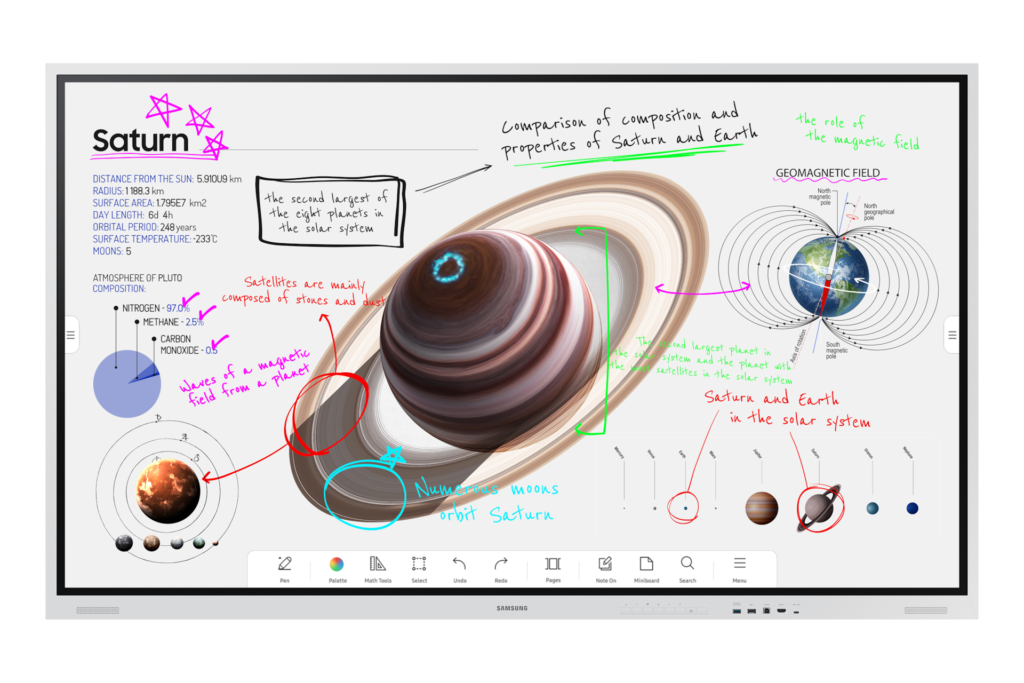
Samsung Flip Pro WM75B 75″ 4K Interactive Touch Display Review in Kenya
As hybrid collaboration and digital learning become central to Kenya’s corporate and educational environments, interactive display solutions are replacing traditional projectors and non-interactive screens. The Samsung Flip Pro WM75B — a 75-inch 4K UHD interactive touch display — is engineered to support structured collaboration, dynamic presentations, and interactive learning with enterprise-grade performance and professional features.
This review evaluates the Flip Pro WM75B’s visual performance, touch responsiveness, collaboration capabilities, connectivity options, and real-world applicability for Kenyan organizations.
Display & Visual Clarity — 75″ 4K UHD
Featuring a 75-inch 4K UHD (3840 × 2160) panel, the Samsung Flip Pro WM75B delivers:
High pixel density for crisp text and detailed visuals
Clear rendering of complex data, spreadsheets, and infographics
Smooth video playback during hybrid meetings and lessons
Wide viewing angles for consistent visibility across the room
The panel’s anti-glare coating reduces reflection in brightly lit Kenyan office and classroom environments — facilitating clear visibility without distraction. In boardrooms, lecture halls, and training centers, this level of clarity helps reduce eye strain during prolonged collaboration sessions.
Multi-Touch Interaction & Natural Writing Experience
A standout characteristic of the Flip Pro is its responsive multi-touch technology:
Up to 20 simultaneous touch points
Low-latency pen input for smooth annotation
Natural writing feel with brush and pen modes
Intuitive erase gestures for fast clean-up
These capabilities make the Flip Pro WM75B ideal for interactive collaboration — whether brainstorming in a corporate strategy room, guiding students through lesson material, or facilitating team workshops where participants annotate directly on the display.
Built-In Collaboration & Connectivity Features
The Samsung Flip Pro WM75B is engineered to simplify content sharing and hybrid collaboration workflows:
Smart wireless sharing via SmartView+, AirPlay 2
3-in-1 USB-C port supporting display, touch control, and power delivery (up to 15 W)
Multiple HDMI, USB, DP, LAN ports for flexible wired connectivity
Embedded front control panel for quick access
Wireless sharing enables presenters to connect tablets, laptops, and smartphones without cables — reducing setup time and supporting Bring-Your-Own-Device (BYOD) environments common in Kenyan enterprises and educational institutions.
Software Ecosystem & Security
Running on Samsung’s embedded Tizen OS, the Flip Pro WM75B supports:
Built-in whiteboard and annotation tools
Content management and file access capabilities
Optional integration with productivity and learning apps
Samsung Knox security for controlled access in enterprise deployments
This software combination supports interactive workflows while maintaining platform reliability and enterprise-grade security.
Wireless Collaboration & Group Productivity
SmartView+ enables wireless connectivity for multiple devices simultaneously, supporting:
Multi-presenter sessions
Split-screen multi-view layouts
Seamless content handoffs during meetings
Such capabilities are especially valuable in workshops and collaborative classrooms where multiple participants present content in rapid succession. Wireless multi-device support enhances inclusivity and participation.
Use Cases in Kenya — Business & Education
The Samsung Flip Pro WM75B is a versatile tool for many structured environments:
Corporate Workspaces
Boardroom presentations and data reviews
Hybrid team meetings with remote participants
Cross-department collaboration sessions
Educational Institutions
Interactive classroom instruction
Student presentations and group activities
Lecture delivery with multimedia support
Training & Development Centers
Professional upskilling workshops
Technical training modules
Certification programs
Unlike consumer touchscreen TVs, the Flip Pro WM75B is designed for high-frequency collaboration and educational workflows where performance, latency, and multi-user interaction matter.
Deployment & Installation Considerations in Kenya
For optimal performance, planning should include:
Room size and viewing distance to ensure clear visibility for all users
Secure wall mounting (VESA-compatible) or mobile stand options
Reliable network connectivity for wireless collaboration
Consistent power delivery with surge protection
Professional installation ensures usability and long-term performance, especially in high-use corporate and institutional spaces.
Samsung Flip Pro WM75B vs Traditional Displays
| Feature | Samsung Flip Pro WM75B | Standard TV / Projector |
|---|---|---|
| Native 4K UHD | ✔ | Varies |
| Multi-Touch Interaction | Up to 20 points | ✘ |
| Wireless Sharing | SmartView+, AirPlay 2 | Limited |
| Built-In Whiteboard | ✔ | ✘ |
| Connectivity | USB-C, HDMI, DP, LAN | Limited |
| Hybrid Collaboration | Integrated | External devices needed |
Compared with traditional displays and projection setups, the Flip Pro WM75B offers faster meeting start-ups, richer interaction, and reduced dependency on external peripherals — aligning with modern hybrid work and learning demands.
Is the Samsung Flip Pro WM75B Worth the Investment in Kenya?
For occasional presentations, standard large-screen TVs may suffice. However, for organizations that rely on collaborative workflows, hybrid meetings, and interactive learning, the Samsung Flip Pro WM75B becomes a core productivity tool.
Benefits include:
Reduced setup and transition times
Enhanced engagement through touch interaction
Flexible connectivity to support BYOD policies
Enterprise-ready security and software support
When evaluated as collaboration infrastructure rather than just a display, the Flip Pro WM75B delivers measurable productivity value for Kenyan enterprises and institutions.