
Uncategorized
Samsung Odyssey G3 (LS27AG300NMXUE)
Introduction & First Impressions
Samsung continues to expand its gaming lineup with the Samsung Odyssey G3 a 27-inch Full HD display designed for entry-level gamers looking for smooth performance without a high price tag. With model number LS27AG300NMXUE, this monitor targets users who want to step into high-refresh-rate gaming without compromising affordability.
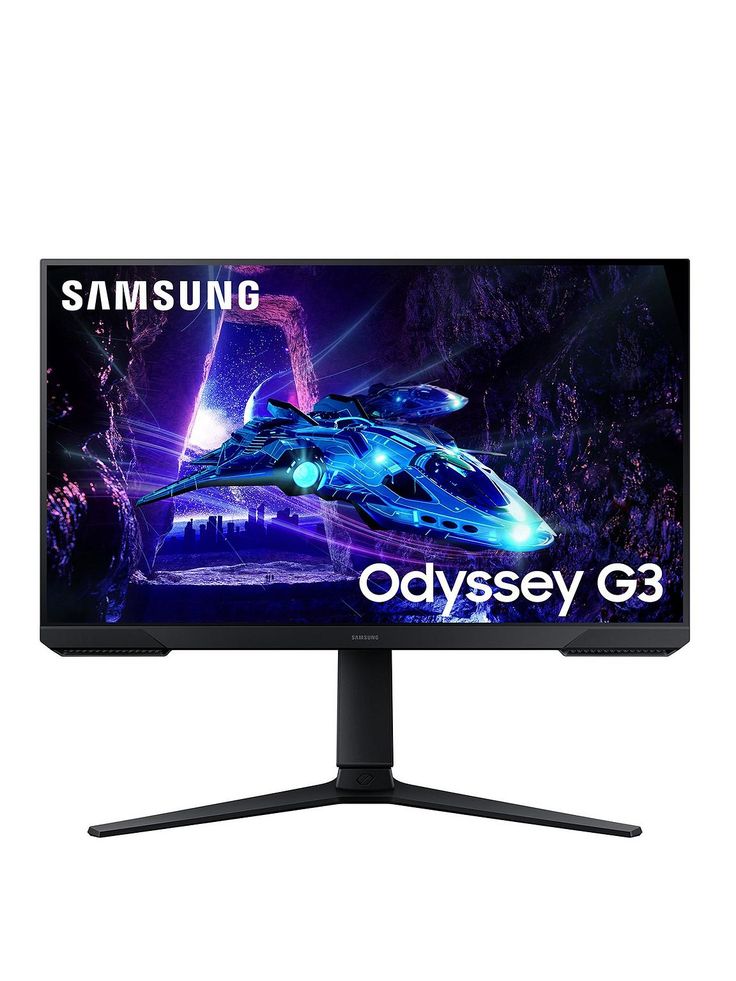
At first glance, the Odyssey G3 makes a confident impression. Samsung’s design language is clearly present clean lines, a slim profile, and a dark finish that fits naturally into modern gaming setups. The minimal bezels also help enhance immersion, especially during gameplay.
But design is only part of the story. The real question is whether this 27-inch panel delivers the responsiveness and smooth performance that gamers expect from the Odyssey series.
In this review, we put the LS27AG300NMXUE through its paces examining everything from motion performance and responsiveness to everyday usability and connectivity. Whether you’re searching for an affordable Odyssey G3 or a solid entry into high-refresh-rate gaming, here’s what you need to know.
| Specification | Details |
|---|---|
| Model Number | LS27AG300NMXUE |
| Monitor Type | Samsung Odyssey G3 |
| Screen Size | 27″ |
| Panel Technology | VA |
| Resolution | 1920 × 1080 (Full HD) |
| Refresh Rate | 144Hz |
| Response Time | 1ms (MPRT) |
| Brightness | 250 nits (typical) |
| HDR Support | None |
| Connectivity | 1× HDMI, 1× DisplayPort 1.2, Audio Out |
| Colour | Black |
| Category | FHD |
| Segment | Flat |
Design & Build Quality
The Samsung Odyssey G3 arrives in Samsung’s signature black finish, maintaining a clean and minimal gaming aesthetic. The 3-sided borderless design is immediately noticeable, with slim bezels on the top and sides that enhance immersion without making the 27-inch panel feel bulky on a desk.
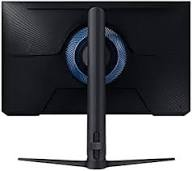
Around the back, the monitor keeps things simple with a clean layout and basic cable management, helping reduce clutter even if it lacks advanced routing channels. The unit also supports 100 × 100 mm VESA mounting, making it easy to attach to a monitor arm or wall mount for a more customized setup.
The stand is primarily plastic, but it feels stable and well-balanced in everyday use. While it doesn’t deliver premium materials, the overall build quality is consistent with Samsung’s budget gaming lineup solid enough to avoid wobble or structural concerns over time.
Ergonomics
One area where the Odyssey G3 performs better than expected is ergonomics. Unlike many budget monitors, it offers height adjustment, tilt, swivel, and pivot, allowing users to fine-tune the display position for both comfort and productivity.
While the adjustment range may not be as refined as high-end professional monitors, it is more than sufficient for most users, whether for gaming or general use. For those seeking maximum flexibility or a cleaner desk setup, a third-party VESA arm remains a great option
Display Performance
Colour Accuracy & Vibrancy
The Samsung Odyssey G3 LS27AG300NMXUE is built around a VA panel, which prioritizes contrast over outright colour accuracy. Colours appear reasonably vibrant for a budget gaming monitor, with deep blacks that enhance contrast in darker scenes.
However, compared to IPS panels, colour reproduction is slightly less accurate, and viewing angles are more limited. This makes it suitable for general use, gaming, and media consumption, but less ideal for colour-critical professional work such as photo editing.
Resolution & Sharpness
With a resolution of 1920 × 1080 on a 27-inch display, pixel density is relatively low. While text and images remain usable for everyday tasks, sharpness is not as crisp as smaller Full HD panels or higher-resolution displays.
For casual use and gaming, this is generally acceptable, but users sensitive to detail may notice some softness, especially when sitting close to the screen.
Motion Handling & Refresh Rate
One of the strongest aspects of the Odyssey G3 is its 144Hz refresh rate, which delivers noticeably smoother motion compared to standard 60Hz displays. Scrolling feels fluid, and fast-paced games benefit from improved responsiveness.
The monitor also features a 1ms (MPRT) response time, helping to reduce motion blur. That said, as a VA panel, some minor ghosting can still be visible in fast-moving scenes, particularly in darker transitions a common trade-off at this price point.
Key Features
Everyday Computing
Web Browsing
Office Work
Light Media Consumption
VA Panel Technology — Delivers strong contrast with deeper blacks, ideal for gaming and media
1080p Resolution (1920 × 1080) — Clear visuals suitable for everyday use, though less sharp on a 27″ panel
144Hz Refresh Rate — Ensures smooth motion for gaming and fast-paced content
AMD FreeSync Support — Reduces screen tearing for a smoother gaming experience
1ms (MPRT) Response Time — Helps minimize motion blur in fast scenes
Connectivity — 1× HDMI, 1× DisplayPort 1.2, 3.5mm Audio Out
Eye Comfort Features — Flicker-free technology and blue light filter help reduce eye strain
How Does It Compare to Similar Monitors?
Context matters when evaluating the Samsung Odyssey G3 LS27AG300NMXUE. Positioned as a budget 144Hz gaming monitor, it competes with both higher-end IPS displays and similarly priced gaming-focused alternatives.
Comparison Overview
| Model | Key Specs | vs Samsung Odyssey G3 |
|---|---|---|
| Samsung Odyssey G3 (LS27AG300NMXUE) | 27″, 1080p, 144Hz, VA | Strong contrast, best value pick |
| LG 27GP850-B | 27″, 1440p, 165Hz, IPS | Sharper & more colour-accurate, but significantly pricier |
| AOC C27G2Z | 27″, 1080p, 165Hz, VA (curved) | Faster refresh + curved immersion |
| MSI Optix G273 | 27″, 1080p, 165Hz, IPS | Better colours, similar price tier |
Real-World Differences
Gaming Performance
- Odyssey G3: 144Hz + FreeSync → smooth and responsive
- AOC C27G2Z: Slight edge with 165Hz
- MSI Optix G273: Similar performance but cleaner motion (IPS)
Difference is noticeable, but not huge unless you’re competitive gaming
Colour & Visual Quality
- Odyssey G3 (VA): Better contrast, deeper blacks
- MSI / LG (IPS): Better colours & viewing angles
If you:
- Watch movies → Samsung wins
- Do design/editing → IPS wins
Ergonomics
The Odyssey G3 offers:
- Height
- Tilt
- Swivel
- Pivot
Many competitors at this price:
- Only offer tilt
This is a major real-world advantage most reviews miss
Final Positioning
The Samsung Odyssey G3 LS27AG300NMXUE stands out not because it beats every competitor—but because it balances:
- Smooth 144Hz performance
- Strong contrast (VA panel)
- Full ergonomic stand
- Affordable price
While rivals may win in specific areas (resolution, colour, refresh rate), the G3 delivers the most balanced package for budget
Rather than excelling in one category, the Odyssey G3 succeeds by offering a well-rounded experience combining smooth gameplay, strong contrast, and rare full ergonomics at a budget price point.”
Frequently Asked Questions
Is the Samsung Odyssey G3 good for everyday computing?
Yes the Samsung Odyssey G3 LS27AG300NMXUE is well-suited for everyday use. Its 1080p resolution and 144Hz refresh rate provide smooth performance for browsing, office work, and general tasks. The VA panel also delivers strong contrast, which enhances media consumption.
Does the Samsung LS27AG300NMXUE support HDR?
No the LS27AG300NMXUE does not support HDR. Users looking for HDR functionality will need to consider higher-end models, typically in the 1440p or 4K range.
What cables and ports does the Samsung Odyssey G3 include?
The Samsung Odyssey G3 (LS27AG300NMXUE) typically includes:
- 1 × HDMI
- 1 × DisplayPort 1.2
- 3.5mm audio out
This setup is sufficient for connecting PCs, gaming consoles, and most laptops.
Is the Samsung Odyssey G3 compatible with Mac and Windows?
Yes the LS27AG300NMXUE works with both macOS and Windows systems via HDMI or DisplayPort. However, it does not include USB-C, so newer laptops may require an adapter.
How does the Samsung Odyssey G3 compare to similar budget monitors?
The Samsung Odyssey G3 competes strongly in the budget Full HD gaming segment. It stands out with its 144Hz refresh rate, high contrast VA panel, and full ergonomic stand. While some competitors offer better colour accuracy (IPS) or higher refresh rates, the G3 delivers a more balanced overall experience at its price point.
Is 1080p good on a 27-inch monitor?
1080p on a 27-inch display is usable but not the sharpest option. Users may notice slightly softer text and images compared to smaller screens or higher resolutions like 1440p. However, for gaming and general use, it remains acceptable for most users.