
Uncategorized
Samsung Smart Monitor M5 (LS27DM500EMXUE)
Introduction & First Impressions
Samsung continues to be a major player in the display market with the Samsung Smart Monitor M5 (LS27DM500EMXUE) a 27-inch Full HD display designed for remote work and home entertainment. Positioned as an entry-level smart monitor, it caters to users looking for convenience and versatility at an affordable price point.
At first glance, the Smart Monitor M5 reflects the signature design approach of Samsung Electronics clean lines, a slim profile, and a minimalist black finish that fits effortlessly into modern workspaces. However, its appeal goes beyond aesthetics.
What sets the M5 apart is its smart functionality. Powered by Samsung’s Tizen OS, the monitor allows users to stream content, browse the web, and access apps like Netflix and YouTube without needing a connected PC effectively bridging the gap between a traditional monitor and a smart TV.
That said, while the 27-inch panel offers a comfortable viewing size, its Full HD resolution is best suited for general productivity and media consumption rather than pixel-critical tasks or high-end gaming.
In this review, we take a closer look at how the LS27DM500EMXUE performs in real-world use from colour reproduction and usability to connectivity and overall value.
Full Technical Specifications
| Specification | Details |
|---|---|
| Model Number | LS27DM500EMXUE |
| Monitor Type | Samsung Smart Monitor M5 |
| Screen Size | 27″ |
| Panel Technology | VA |
| Resolution | 1920 × 1080 (Full HD / 1080p) |
| Refresh Rate | 60Hz |
| Response Time | 5ms (GtG) |
| Brightness | 250–300 nits (typical) |
| HDR Support | HDR10 (basic support) |
| Connectivity | HDMI 2.0 ×2, USB-A ×2, Wi-Fi, Bluetooth |
| Colour | Black |
| Category | FHD |
| Segment | Smart (Smart Monitor M5) |
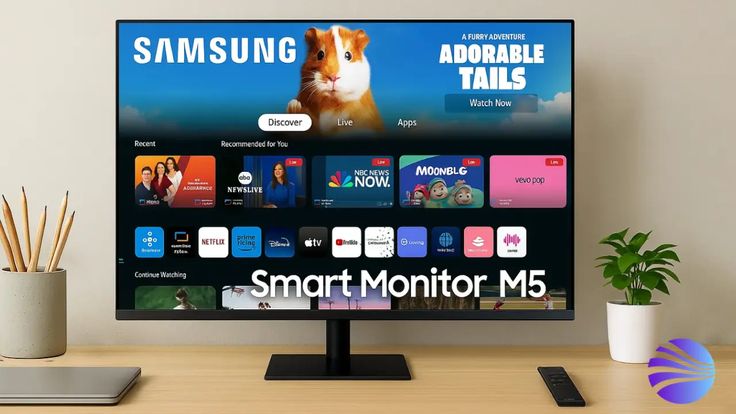
Design & Build Quality
The Samsung Smart Monitor M5 (LS27DM500EMXUE) arrives in Samsung’s signature black finish, featuring a slim-bezel design that immediately gives it a modern, minimal look. The thin bezels on the top and sides help the 27-inch panel feel immersive without dominating desk space, making it well-suited for both work and entertainment setups.
Around the back, the monitor maintains a clean and uncluttered appearance, with ports positioned for easy access. It also includes VESA mount compatibility, allowing users to pair it with a monitor arm or wall mount for a more flexible setup.
The included stand is made of plastic but feels reasonably sturdy for everyday use. While it doesn’t offer premium materials, it provides a stable base that supports the display without noticeable wobble during normal use.
Ergonomics
Ergonomically, the Smart Monitor M5 is fairly basic. It supports tilt adjustment only, allowing users to find a comfortable viewing angle. However, it lacks height adjustment, swivel, and pivot functionality, which are typically found on more productivity-focused monitors.
For users who require greater flexibility, the VESA mount support makes it easy to upgrade to a third-party monitor arm.
Display Performance
Colour Accuracy & Vibrancy
The VA panel used in the Samsung Smart Monitor M5 (LS27DM500EMXUE) delivers solid contrast and respectable colour reproduction for everyday use. Colours appear balanced and natural out of the box, making the monitor suitable for general productivity, web browsing, and media consumption.
However, as expected from a VA panel, viewing angles are adequate rather than wide, with some colour and brightness shifts noticeable when viewed from off-centre positions. This makes it less ideal for collaborative work or colour-critical tasks.
Resolution & Sharpness
With a resolution of 1920 × 1080 spread across a 27-inch display, the pixel density is relatively low. While visuals remain clear enough for everyday tasks such as document editing and streaming, the image lacks the crispness found in higher-resolution QHD or 4K monitors. As a result, text and fine details may appear slightly soft, especially when viewed up close.
Motion Handling & Refresh Rate
The monitor operates at a standard 60Hz refresh rate, which is well-suited for streaming, casual browsing, and general office work. Video playback is smooth and consistent, aligning with its smart TV–like functionality.
That said, the limited refresh rate and response time mean it is not designed for fast-paced gaming or high-motion content.
Key Features
Ideal For:
- Working from home
- Streaming Netflix and YouTube
- Video conferencing
- Light productivity tasks
VA Panel Technology — Delivers strong contrast and decent colour reproduction for everyday use
Full HD Resolution (1920 × 1080) — Suitable for general productivity and media consumption, though not the sharpest at this screen size
60Hz Refresh Rate — Smooth performance for office work, browsing, and video playback
Connectivity — HDMI 2.0 ×2, USB-A ×2, Wi-Fi, Bluetooth
Smart TV Functionality (Tizen OS) — Access apps like Netflix and YouTube without needing a PC
Eye Comfort Features — Flicker-free technology and blue light reduction help reduce eye strain during extended use
Who Should Buy the Samsung Smart Monitor M5 (LS27DM500EMXUE)?
The Samsung Smart Monitor M5 is best suited for users who value convenience, versatility, and an all-in-one display experience.
Working From Home — Ideal for everyday office tasks such as browsing, document editing, and emails, with a comfortable 27-inch screen and simple setup.
Streaming Netflix and YouTube — Built-in smart features powered by Tizen OS allow you to stream content directly without needing a PC or external device.
Video Conferencing — Works well for online meetings when paired with external webcams and peripherals, offering a clean and minimal desk setup.
Light Productivity Tasks — Suitable for general use such as spreadsheets, presentations, and multitasking, though not intended for demanding professional workloads.
On the other hand, users looking for a high-performance gaming monitor or pixel-dense display for creative work may find the Full HD resolution and 60Hz refresh rate limiting.
How Does It Compare to Similar Monitors?
Context matters. Within the entry-level smart monitor and 27-inch Full HD segment, the Samsung Smart Monitor M5 (LS27DM500EMXUE) competes with a mix of direct smart display rivals and alternative use-case monitors.
| Model | Key Specs | Comparison |
|---|---|---|
| Samsung Smart Monitor M5 (LS27DM500EMXUE) | VA, 1080p, 60Hz, 27″ | Our pick for balanced smart functionality |
| LG 27SR50F-B | 27″, IPS, 1080p, webOS | Competing smart platform (webOS vs Tizen) |
| Samsung Smart Monitor M7 (32-inch) | 4K, larger screen | Step-up option with higher resolution |
| ViewSonic VX2718-PC-MHD | FHD, 165Hz, gaming-focused | Better for gaming, lacks smart features |
While each alternative serves a different purpose, the Samsung Smart Monitor M5 stands out for its all-in-one functionality. Its integration with Samsung’s Tizen platform allows users to stream content, browse, and work without relying on a separate PC.
For users prioritising convenience and versatility over high refresh rates or ultra-sharp resolution, it remains a compelling option in its categor
Final Verdict
The Samsung Smart Monitor M5 (LS27DM500EMXUE) is a well-executed 27-inch Full HD display that earns its place in Samsung’s lineup. Designed for remote workers and home entertainment users, it offers a practical combination of smart functionality, ease of use, and everyday performance at a competitive price point.
While its 1080p resolution may not deliver the sharpness of higher-end QHD or 4K displays, the monitor makes up for it with built-in smart features powered by Samsung’s Tizen platform allowing users to stream content, browse, and work without needing a connected PC.
Is it the best Full HD smart monitor on the market right now? For many users, it stands out as one of the most balanced options available. It competes closely with alternatives from brands like LG and ASUS, offering a strong mix of convenience, functionality, and overall value.
Frequently Asked Questions
Is the Samsung Smart Monitor M5 (LS27DM500EMXUE) good for working from home?
Yes, it’s well-suited for remote work thanks to its 27-inch screen, simple setup, and built-in smart features. Users can access apps, browse, and even work without always needing a connected PC, making it a convenient all-in-one display.
Does the Samsung LS27DM500EMXUE support HDR?
Yes, it supports HDR10, but performance is basic due to limited brightness. It can handle HDR content, but it’s not designed for a true high-dynamic-range viewing experience.
What ports does the Samsung Smart Monitor M5 include?
The monitor includes HDMI 2.0 ×2, USB-A ×2, Wi-Fi, and Bluetooth. This covers most everyday connectivity needs, though it does not include USB-C or DisplayPort.
Is the Samsung Smart Monitor M5 compatible with Mac and Windows?
Yes, it is compatible with both macOS and Windows systems via HDMI connection. It works well with laptops and desktops, though users with USB-C–only devices may require an adapter.
How does the Samsung Smart Monitor M5 compare to similar smart monitors?
It competes well in the entry-level smart monitor category, offering a balanced mix of affordability and functionality. Compared to alternatives from brands like LG and ASUS, it stands out for its built-in smart platform and ease of use.