
Uncategorized
Samsung Smart Monitor M7 (LS43FM700UMXUE)
Introduction & First Impressions
Samsung continues to expand its display lineup with the Samsung Smart Monitor M7, a 43-inch 4K display designed for remote work, media consumption, and everyday productivity. With model number LS43FM700UMXUE, it aims to bridge the gap between a traditional monitor and a smart TV, offering a more flexible all-in-one solution for modern setups.
At first glance, the Smart Monitor M7 makes a strong impression. Samsung’s design language is immediately recognizable clean lines, a slim profile, and a minimalist black finish that blends well into both home offices and living spaces. The large 43-inch screen also gives it a presence that feels closer to a TV than a conventional monitor.
But design is only part of the story. The real question is whether this hybrid display can deliver a balanced experience across work, streaming, and general use.
In this review, we take a closer look at the Samsung LS43FM700UMXUE, evaluating its display quality, smart features, connectivity, and real-world performance. Whether you’re looking for a versatile home office display or a screen that can double as an entertainment hub, this review will help you decide if the Smart Monitor M7 is the right fit
Full Technical Specifications
Before diving into performance, here’s a complete breakdown of the Samsung Smart Monitor M7 (LS43FM700UMXUE):
| Specification | Details |
|---|---|
| Model Number | LS43FM700UMXUE |
| Monitor Type | Samsung Smart Monitor M7 |
| Screen Size | 43″ |
| Panel Technology | VA |
| Resolution | 3840 × 2160 (Ultra HD / 4K) |
| Aspect Ratio | 16:9 |
| Refresh Rate | 60Hz |
| Response Time | ~4ms (GtG) |
| Brightness | 300 nits (Typical) |
| HDR Support | HDR10 |
| Operating System | Tizen Smart TV Platform |
| Smart Features | Built-in apps (Netflix, YouTube, Prime Video), screen mirroring |
| Connectivity | HDMI 2.0 ×2, USB-A ×2, USB-C (65W Power Delivery) |
| Wireless | Wi-Fi, Bluetooth |
| Audio | Built-in speakers |
| Colour | Black |
| Category | UHD (4K) |
| Segment | Smart Monitor |
Design & Build Quality
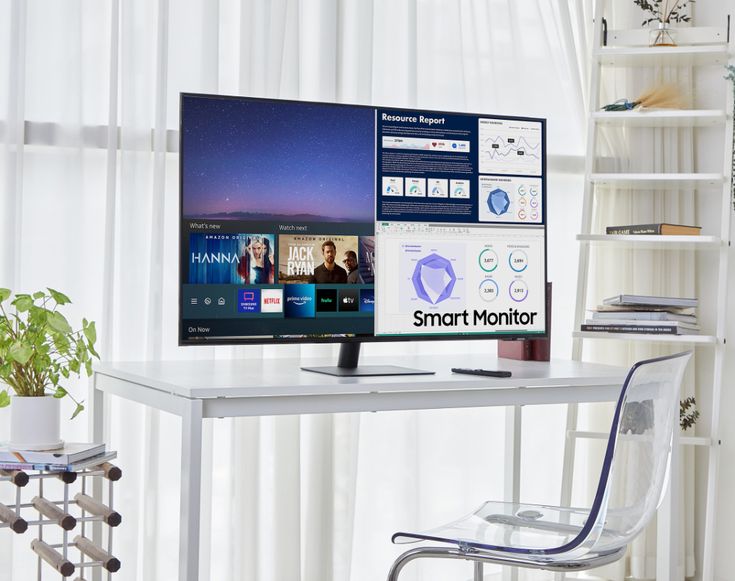
The Samsung Smart Monitor M7 features a clean, minimalist design in Samsung’s signature black finish. The slim bezels along the top and sides help keep the focus on the expansive 43-inch display, giving it a modern look that fits well in both home office setups and living spaces.
Given its size, the M7 feels closer to a compact TV than a traditional monitor. This makes it versatile for desk use, media consumption, or even wall-mounted setups in smaller rooms.
Around the back, the monitor maintains a tidy layout with integrated cable management and full VESA mount compatibility, allowing for easy installation on monitor arms or walls.
The included stand is primarily plastic but feels stable enough to support the large panel without noticeable wobble. Overall build quality is solid and consistent with Samsung’s consumer display lineup.
Ergonomics
Ergonomics are relatively basic. The stand supports tilt adjustment only, allowing you to angle the display for comfortable viewing.
However, it lacks:
- height adjustment
- swivel
- pivot
Because of this, users who require a more flexible setup may want to use a third-party VESA mount or monitor arm, especially given the monitor’s large size.
Display Performance
Colour Accuracy & Vibrancy
The VA panel on the Samsung Smart Monitor M7 delivers solid colour performance for everyday use, with balanced tones that work well for browsing, media consumption, and general productivity. Colours appear natural rather than overly saturated, making it comfortable for extended viewing.
Viewing angles are decent for a VA panel, although not as wide as IPS displays. This means the best image quality is achieved when viewed head-on, which is typical for desk or personal use.
Resolution & Sharpness
With a 4K resolution of 3840 × 2160 on a 43-inch screen, the M7 provides plenty of detail for both work and entertainment. Text remains clear for documents and web browsing, while the large screen size makes multitasking easier with multiple windows open side by side.
This combination of size and resolution makes it particularly effective as a hybrid display for both productivity and media use.
Motion Handling & Refresh Rate
With a standard 60Hz refresh rate, the Smart Monitor M7 is best suited for everyday tasks and media consumption. Streaming content, videos, and casual use appear smooth and stable.
However, it is not designed for high-performance gaming, and fast-paced motion will not be as fluid as on higher refresh rate displays.
Key Features
Working From Home
Streaming Netflix and YouTube
Video Conferencing (with optional camera)
Light Productivity Tasks
VA Panel Technology — High contrast ratio delivers deeper blacks and better visual depth for media consumption
4K UHD Resolution (3840 × 2160) — Sharp detail and large screen space for multitasking and entertainment
60Hz Refresh Rate — Smooth and stable performance for everyday use and streaming
Connectivity — HDMI 2.0 ×2, USB-A ports, USB-C (65W Power Delivery), plus built-in Wi-Fi and Bluetooth
Tizen Smart TV Platform — Access apps like Netflix, YouTube, and Prime Video without needing a PC
Smart Video Conferencing Support — Compatible with video call apps (SlimFit camera sold separately)
Eye Comfort Features — Flicker-free technology and Eye Saver Mode reduce eye strain during long sessions
HDR10 Support — Basic HDR compatibility for supported content (limited impact due to brightness levels)
Who Should Buy the Samsung Smart Monitor M7?
The Samsung Smart Monitor M7 (LS43FM700UMXUE) is an excellent choice if you fall into one of these categories:
Working From Home — The large 43-inch screen provides ample space for multitasking, while USB-C connectivity and wireless features make it easy to connect laptops or work without a full desktop setup.
Streaming Netflix and YouTube — With built-in smart apps powered by Samsung’s Tizen platform, you can stream content directly without needing a PC or external device.
Video Conferencing — Support for video call apps and compatibility with an optional SlimFit camera make it suitable for meetings and remote collaboration.
Light Productivity Tasks — Ideal for browsing, documents, and everyday computing, with enough screen space to run multiple windows comfortably.
On the other hand, if you need a high-performance gaming monitor with fast refresh rates and low latency, this may not be the right choice.
How Does It Compare to Similar Monitors?
Context is everything. The Samsung Smart Monitor M7 (LS43FM700UMXUE) sits in a niche category of smart monitors — displays that combine traditional monitor functionality with built-in TV-style features.
Here’s how it compares to similar options:
| Model | Key Specs | vs Samsung Smart Monitor M7 |
|---|---|---|
| Samsung Smart Monitor M7 (LS43FM700UMXUE) | 43″ VA, 4K, 60Hz, Tizen OS | Larger screen, strong all-in-one experience |
| LG Smart Monitor (webOS) | 32″ IPS, 4K, webOS | Better viewing angles, smaller screen |
| Samsung Smart Monitor M8 (32″) | 4K IPS, webcam included | Premium design, built-in camera, higher price |
Key Differences
- Screen Size Advantage
The M7’s 43-inch panel offers significantly more workspace than most smart monitors, making it better suited for multitasking and media consumption. - VA vs IPS Panels
The M7 uses a VA panel for deeper contrast, while alternatives like LG and the M8 use IPS for wider viewing angles and slightly better colour consistency. - Smart Platform Experience
Samsung’s Tizen OS provides a smooth, TV-like interface with access to major streaming apps, similar to LG’s webOS ecosystem. - Feature Trade-offs
The M8 adds a built-in webcam and more premium design elements, while the M7 focuses on value and screen size.
Final Take
While alternatives from LG and Samsung’s own M8 offer strong competition, the Samsung Smart Monitor M7 stands out by delivering a larger, more immersive display at a more accessible price point, making it one of the most practical smart monitor options for mixed work and entertainment use.
Frequently Asked Questions
Is the Samsung Smart Monitor M7 good for working from home?
Yes, the Samsung Smart Monitor M7 is well-suited for remote work thanks to its large 43-inch screen, 4K resolution, and versatile connectivity. It provides plenty of space for multitasking and can even be used without a PC for certain tasks via its built-in smart platform.
Does the Samsung LS43FM700UMXUE support HDR?
Yes, the LS43FM700UMXUE supports HDR10. While it enhances contrast and brightness in supported content, the overall HDR impact is limited due to the monitor’s brightness level.
What cables and ports does the Samsung Smart Monitor M7 include?
The Samsung Smart Monitor M7 (LS43FM700UMXUE) includes HDMI 2.0 ports, USB-A ports for peripherals, and a USB-C port with 65W power delivery. It also features built-in Wi-Fi and Bluetooth for wireless connectivity.
Is the Samsung Smart Monitor M7 compatible with Mac and Windows?
Yes, it is fully compatible with both macOS and Windows systems via HDMI and USB-C connections. It also supports wireless screen mirroring for added flexibility.
How does the Samsung Smart Monitor M7 compare to similar smart monitors?
The Samsung Smart Monitor M7 stands out in the smart monitor category by offering a larger 43-inch display combined with Samsung’s Tizen smart platform. Compared to alternatives from LG and Samsung’s own M8 lineup, it focuses more on screen size and value rather than premium extras like built-in webcams.
Final Verdict
The Samsung Smart Monitor M7 (LS43FM700UMXUE) is a versatile 43-inch 4K display that successfully blends the functionality of a traditional monitor with the convenience of a smart TV. Designed for remote work, streaming, and everyday use, it offers a flexible all-in-one solution that fits naturally into modern home setups.
Its large screen size, solid 4K sharpness, and built-in Tizen platform make it especially appealing for users who want a display that can handle both productivity and entertainment without relying heavily on a PC.
That said, it’s important to understand its limitations. The 60Hz refresh rate, basic brightness levels, and limited ergonomic adjustments mean it’s not suited for high-performance gaming or colour-critical professional work.
Overall, for users looking for a simple, multi-purpose display that prioritizes convenience and smart features, the Smart Monitor M7 is a strong and practical choice in its category.